All articles
The importance of metadata in your knowledge base – By Nicholas Graziade
Why you should use metadata in your knowledge base articles.
Published
Category
The importance of metadata in your knowledge base – By Nicholas Graziade

Nicholas Graziade | January 21, 2021
Time for a confession: I am a bit of an Apple Fanboy. If the product has a lowercase letter “i” as a prefix, I probably have some version of the device (though admittedly not always the latest and greatest). One of the things that first intrigued me about modern Macs was their application toward music production. However, one of the things that kept me hooked was the way that I could easily view and manage metadata among my countless musical files. Sure, I could store all my drum or guitar samples in respectively-named folders, but what if the samples crossed something more nebulous, like genre? Metadata to the rescue! Simply applying “tags” such as “Guitar,” “Blues,” and “Fast Tempo,” and I could filter my samples to get exactly what I needed. The same principle applies to a more widespread app, such as iTunes. Here, I can sort all my music by artist, genre, album, and any other detail that I apply to my files.
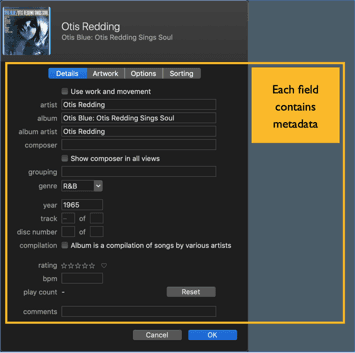
Writers about all things technical love to toss the word metadata around with wanton abandon. Even I’ve written about it tangentially for this blog! It has become so ubiquitous, that the truncated term meta has already entered the vernacular as a sort of shorthand for nested discussions. Because my nerdy obsessions often envelop technical communication, I definitely feel the cliché that the once-innocuous concept has become. But if we look at metadata as strictly “data about data,” we can find all manner of applications to help organize content. Pair this with the simple fact that every single organization I have worked with has never embraced metadata as a proper organizational tool, and the possibilities become practically limitless.
Metadata: Your Virtual Venn Diagram
When I need to explain metadata to the uninitiated, I bring in a familiar concept: the venerable Venn diagram. Metadata is, as above, data about data. But what does that really mean?
Let’s take a look at a simple example. If I have 100 articles in my knowledge base, and I divide them broadly into four topics, I really only have four ways of parsing out my content. Even if I subdivide the topics, I still only have four major categorizations. Metadata eliminates the hierarchy. I’m going to stick to the musical thread and use four tags to identify the content:
Rock & Roll
Blues
Jazz
Pop
Think of these first as discrete categories. If you know anything about the history of recorded music, you’re already in a bit of trouble. Rock & Roll and Blues frequently go hand-in-hand. Then again, so do Jazz and Blues. And Rock & Roll and Pop. And so on, and so on, and so on. There is simply too much overlapping content! Now imagine that you have ten overarching categories. Or twenty. Or fifty. The whole organizational plan gets unwieldy the more categories you add.
If I take the content from our 100 articles and review them outside of a hierarchical scheme, I can apply the tags in their intended method. One article may have the tag “Rock & Roll” while another the tags “Rock & Roll” and “Blues.” Many only have one tag while others all four. If I organize all the content in this way, the Venn diagram makes perfect sense:

Each intersection in the Venn diagram represents articles that contain multiple tags. If I search for an article with both the “Jazz” and “Blues” tags, it will pop out, front and center!
Hierarchies and Metadata
Just because metadata provides a quick way to organized and locate overlapping content doesn’t mean that you should eliminate topics, categories, or other hierarchical mechanisms. One of the best ways that I’ve implemented content strategies involved using the categories and tags in concert with one another. While I organized my articles in categories, I applied tags to each article to help create relationships that guided my audience from one idea to the next.
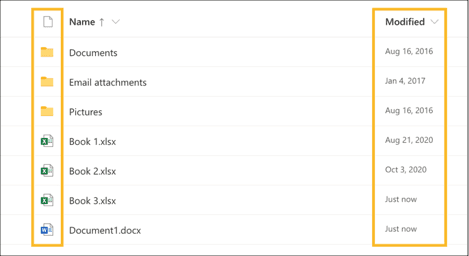
Almost every content, knowledge, or learning management system has some mechanism for metadata. One common example are the default header columns in SharePoint. In most libraries, when you upload a document you will see details about the document type and the modified date. These columns will let you sort and filter your data almost immediately. For example, you could isolate all Excel spreadsheet modified in the past week.
As knowledge base software, KnowledgeOwl also has some simple and effective ways to use metadata: Article Call Outs or Tags. I found article call outs particularly useful to proudly promulgate the videos that my colleagues and I had been creating. The simple reel-to-reel icon was often enough to drive our audience toward particular articles, especially because they knew that a short how-to video would await.
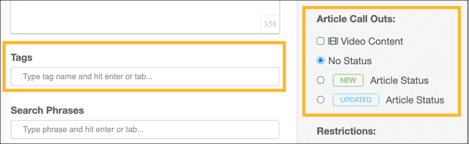
To really drive the point home, I would always add the tag “Video” to these articles. In conjunction with other tags, such as “Image Upload” or “HTML,” I noticed a distinct trend toward the tagged articles. Keep in mind that while the “video” tag was not directly related to the topic at hand, it gave my audience one more way to sort through the content. Keep in mind that this can also assist writers, content creators, and other teammates using your knowledge management system. You can tag articles with details specific to your processes that can help identify content created for a specific project, articles that might need revision, internally-relevant updates (such as articles tied to release notes), and so forth.
How Meta Can You Get?
I can endlessly promulgate the virtues of metadata, but I think the key point to take home is that it provides a practical alternative to organizing your content. I’ve successfully built content management structures with hundreds of files that completely abandoned folders. With a handful of metadata points, my team and I could find anything we needed. As for knowledge management? Well, when you have over 1,500 articles to your name in a single knowledgebase, anything that can help your readers is a welcome addition.
{{snippet.nicholasGraziade}}
{{snippet.Disqus}}

Written by
Nicholas Graziade
Nicholas is a technical writer, instructional designer, and knowledge management expert from Upstate New York's Capital District. He began using KnowledgeOwl in 2016 and has been a dedicated fanboy ever since!
When not obsessing over the nuances of a web page's navigation sidebar, he is also a professional bassist and a practitioner of Japanese sword arts.

Follow these 3 steps to improve your knowledge base
1
Get expert tips every month in your inbox
No spam, pinky promise.


2
Try the knowledge base software your team will fall in love with
Reduce tickets, make information easy to find.
Happier employees, happier customers.

3
Become the tech writer everyone respects
Check out our podcast, The Not-Boring Tech Writer.

How teams are using KnowledgeOwl
Loved by 3,200+ knowledge base authors in software companies around the world