
All articles
New KnowledgeOwl API documentation - and how to create your own
Announcing our new API documentation! View our new docs, learn how to create your own using an OpenAPI spec and Redoc, and share your thoughts.
Published
Category
New KnowledgeOwl API documentation (and how to make your own) – By Deborah Barnard

Deborah Barnard | Octoberer 14, 2021
We're delighted to announce a complete overhaul of our API documentation! This post introduces the new docs and resources, and outlines our future plans. We hope that the new documentation will improve the experience for our API users. At the same time, this project has allowed us to start offering some support for REST API documentation in KnowledgeOwl.
Want to go straight to the docs? One thing that hasn't changed is the URL: View our API documentation Go take a look around, and please get in touch with any feedback.
Comprehensive endpoint reference
We have an all-new, comprehensive, API endpoint reference, with a fresh look and feel.
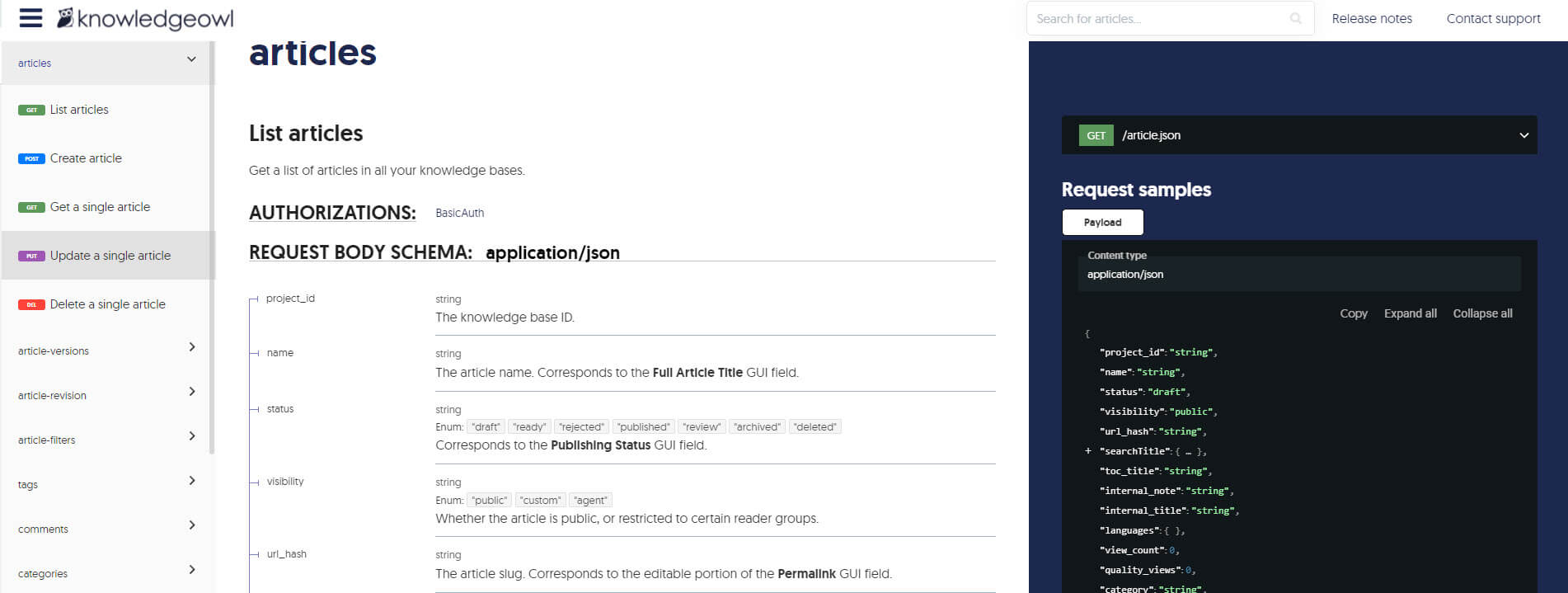
Created within KnowledgeOwl using an OpenAPI spec file and Redoc, the endpoint reference lists every endpoint and parameter in the API, presented in a popular three-column style. This greatly expands our existing endpoint documentation, organizes it into a single continuous display, and displays things with a bit of a facelift. We're incredibly excited to share it with you. 😊
Refreshed and expanded introductory material
Using the KnowledgeOwl API is a refactored introductory section, containing general usage information, including authentication. This retains information from our existing API docs, but edited to bring it in line with the style and layout of other sections of the knowledge base.
Working with APIs is a brand new section, introducing REST APIs, how to call an API using curl or Postman, and listing more learning resources. This section aims to support users who are unfamiliar with APIs.
Guidance on creating your own REST API docs in KnowledgeOwl
REST API documentation describes how to create your own endpoint reference in KnowledgeOwl, using OpenAPI and Redoc. If you liked what you saw in the screenshot above, you'll want to check this documentation out! It's the method we ourselves have used, and it allows you to create sleek API docs from your OpenAPI spec.
What's next?
We're now working on a cookbook, a collection of examples of things you can do with our API. If you have an API task you commonly do, or that you think would make a great recipe to share with our user community, please get in touch and let us know!
{{snippet.authorDeborahBarnard}}
{{snippet.Disqus}}

Written by
Deborah Barnard
Deborah is a tech writer who is passionate about readability, accessibility, and all things API-related. When she isn't writing documentation, she can generally be found trying out a new static site generator.
You can find out more about Deborah at Starfall Projects, or connect on LinkedIn.

Follow these 3 steps to improve your knowledge base
1
Get expert tips every month in your inbox
No spam, pinky promise.


2
Try the knowledge base software your team will fall in love with
Reduce tickets, make information easy to find.
Happier employees, happier customers.

3
Become the tech writer everyone respects
Check out our podcast, The Not-Boring Tech Writer.

How teams are using KnowledgeOwl
Loved by 3,200+ knowledge base authors in software companies around the world


























