All articles
Felicity Brand - How to write a book for (and with) an open source community
This is a talk about how to write a book alongside the open source community.
Published
Category
Felicity Brand - How to write a book for (and with) an open source community
Catherine Heath | October 13, 2021
This is a summary of a talk given at Write the Docs Prague 2021.
Felicity loves knitting and crocheting. Firstly, she has a piece of advice for us: you need to be able to fail and make mistakes to learn, and we should embrace it. That’s a great thing for us all to remember.
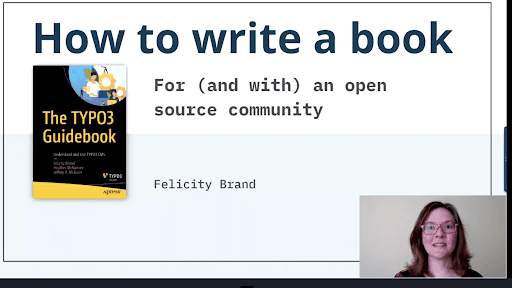
She’s a communications consultant but she identifies as a tech writer. She works for Open Strategy Partners and helps tech writers communicate the value of what they do. She’s written her first book, which is the one she’s going to share with us today. She’ll tell us what the process is like.
About: The book and its community
TYPO3 is a content management system that you use to make websites, and it can be headless. It’s an enterprise CMS so can be massively multisite and multilingual. It has a mature and thriving community around it. There’s a membership association so you pay a nominal fee to become a member of the community.
When they grew, they realized that they needed a company associated with that. They are a 100% owned subsidiary of the association, so they are a not-for-profit. It enables customers to purchase support for the product.
They wanted to write the book because the product is well-known and used particularly in Germany, but they wanted to grow adoption internationally. They thought a book would help with growing adoption. They engaged the agency Felicity works for to help them write the book.
The book has multiple authors from Open Strategy Partners. It was the first book written by the agency and they learnt a lot from it. The book is in two parts: the Overview tour and Hands-on guides.
Processes: Approach and tools
The list of contributors includes developers, project managers, designers, and digital agency leaders.
She was used to writing in Flare and RoboHelp so writing the book was a bit of a change for her. It was important for them to listen and not only talk about how you would do a thing, but also capture the “why”.
They went to a lot of community events and did a lot of interviews, both in person and written. Lots of devs in the community specialized in different areas of the product. Devs are passionate about what they’re building and they’re really happy to talk about it, so getting the information from them was quite easy.
They hate a blank page as much as the next person, so they had a lot of things in place to avoid that. They start every piece of content that they write with a brief. It covers what to include and what not to include.
They took the raw data from the interviews and used it to write content. They wrote the book in Google Docs which worked pretty well. They used the suggestions mode a lot and also the commenting feature. Content is very shareable so they got reviews from people in the community quite easily, and they could check it for accuracy. People in the community even went in to write whole sections.
After they had written the book and handed it over to the publisher Apress, it went through their internal review process. Then they gave it to the community technical reviewers who reviewed for accuracy.
They quoted many people throughout the book, and then she realized that she had to get their approval legally. She advises you to remember that part if you ever write your own book.
She says that writing a book is very different to writing online content. WIth online content, not every page is page one, but with a book you can assume there are pages that come before and after it.
Value: How a book gives back
TYPO3 have their own shop and all the proceeds of the book go back into the community.
A book answers the need for documentation much better because it can cater to quite a broad readership, and it can link out to your existing resources. You can carefully curate your content.
The different audiences include:
New devs - they can work through the book linearly and go through all the guides
Experienced devs - they might be unfamiliar with TYPO3 so they can skim the chapters and scan the guides
Maintainers - they might be evaluating CMSs so they don’t have to wade through the website
Decision makers - they’re the ones deciding whether to buy the product
They promoted the book by publishing a website and articles about the book. They spoke on a few podcasts, did an author Q&A on twitter, and spoke about the book at events and conferences.
Final remarks
Consider a book for your product and your community. It is a valuable asset for the community and can sit alongside your existing resources.
Books aren’t dead - print books still outsell ebooks and occupy a really important part in the world of technical content.
{{snippet.authorCatherineHeath}}
{{snippet.Disqus}}

Written by
Catherine Heath
Catherine is a freelance writer based in Manchester who writes blogs, social media content, and copy. She also designs owl-based images. 🦉

Follow these 3 steps to improve your knowledge base
1
Get expert tips every month in your inbox
No spam, pinky promise.


2
Try the knowledge base software your team will fall in love with
Reduce tickets, make information easy to find.
Happier employees, happier customers.

3
Become the tech writer everyone respects
Check out our podcast, The Not-Boring Tech Writer.

How teams are using KnowledgeOwl
Loved by 3,200+ knowledge base authors in software companies around the world