
All articles
Burnout prevention tips for documentarians
Learn how to prevent and recover from burnout as a documentarian. Discover practical strategies for managing workload, setting boundaries, and maintaining sustainable writing practices in fast-paced digital environments.
Published
Category
Documentarians face unique challenges in today's fast-paced digital world. The constant need to understand complex information, prepare it for various audiences, and keep pace with rapid changes makes us particularly vulnerable to burnout. This article explores the causes of burnout, shares actionable prevention methods, and offers recovery strategies you can try today to improve your quality of life.
What is burnout?
Burnout happens when you're physically and/or emotionally exhausted from too much stress and overwork. For those of us creating documentation, burnout shows up as a complete drain of creative energy—making writing tasks that you once enjoyed feel impossible to start or finish.
Unlike the occasional stress or writer's block we all face, burnout sticks around and affects both your work quality and personal life. If you ignore it, burnout can lead to long-term career unhappiness and health problems.
Signs and symptoms of burnout
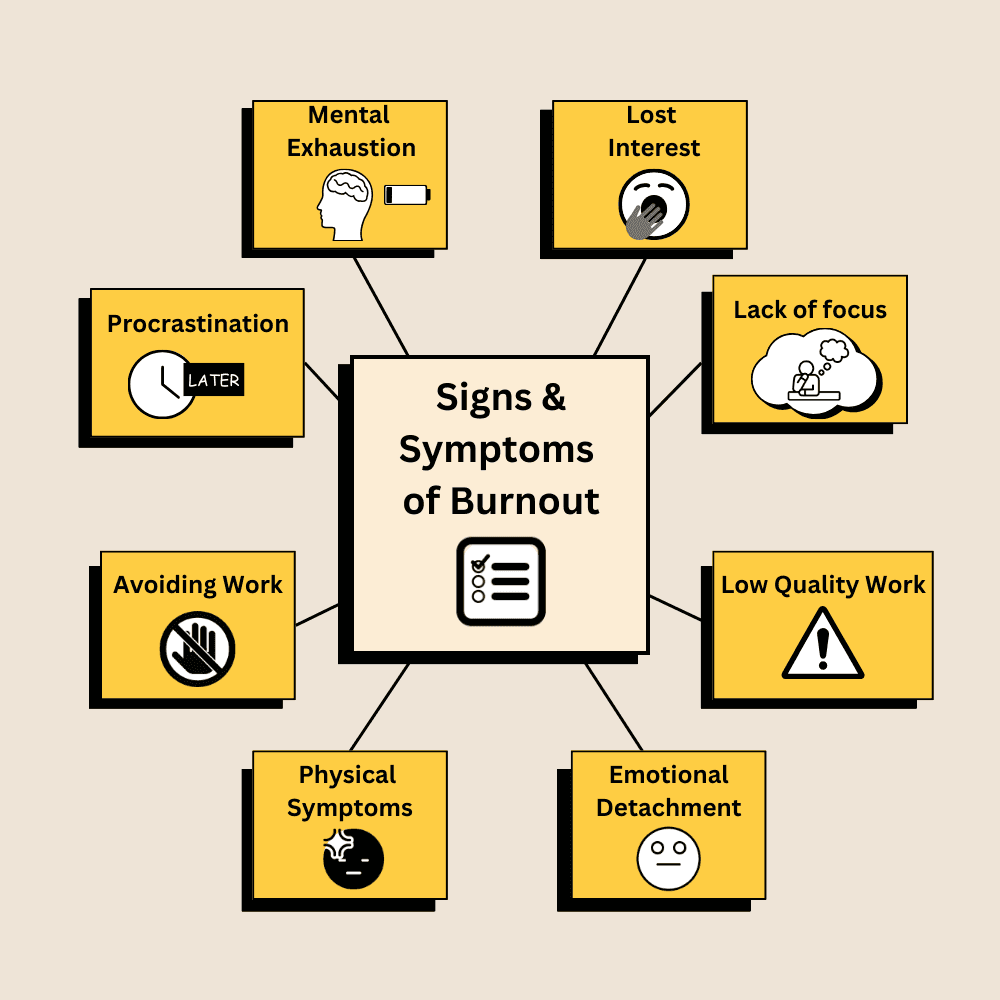
Recognizing burnout early is crucial for effective intervention. Documentarians should watch for these warning signs:
Procrastinating on documentation tasks: You keep putting off writing tasks that you once enjoyed.
Feeling mentally exhausted: Brain fog and exhaustion make it hard to focus on writing.
Losing interest in writing: You no longer feel motivated to craft clear, helpful documentation.
Struggling to focus: It’s difficult to stay focused for extended periods.
Avoiding documentation-related work: The thought of opening your doc tools fills you with dread.
Declining quality: Noticeable decline in writing clarity, accuracy, or attention to detail.
Physical symptoms: Headaches, sleep disturbances, or tension linked to work stress.
Emotional detachment: Feeling disconnected from the purpose of your work.
Understanding the causes of burnout
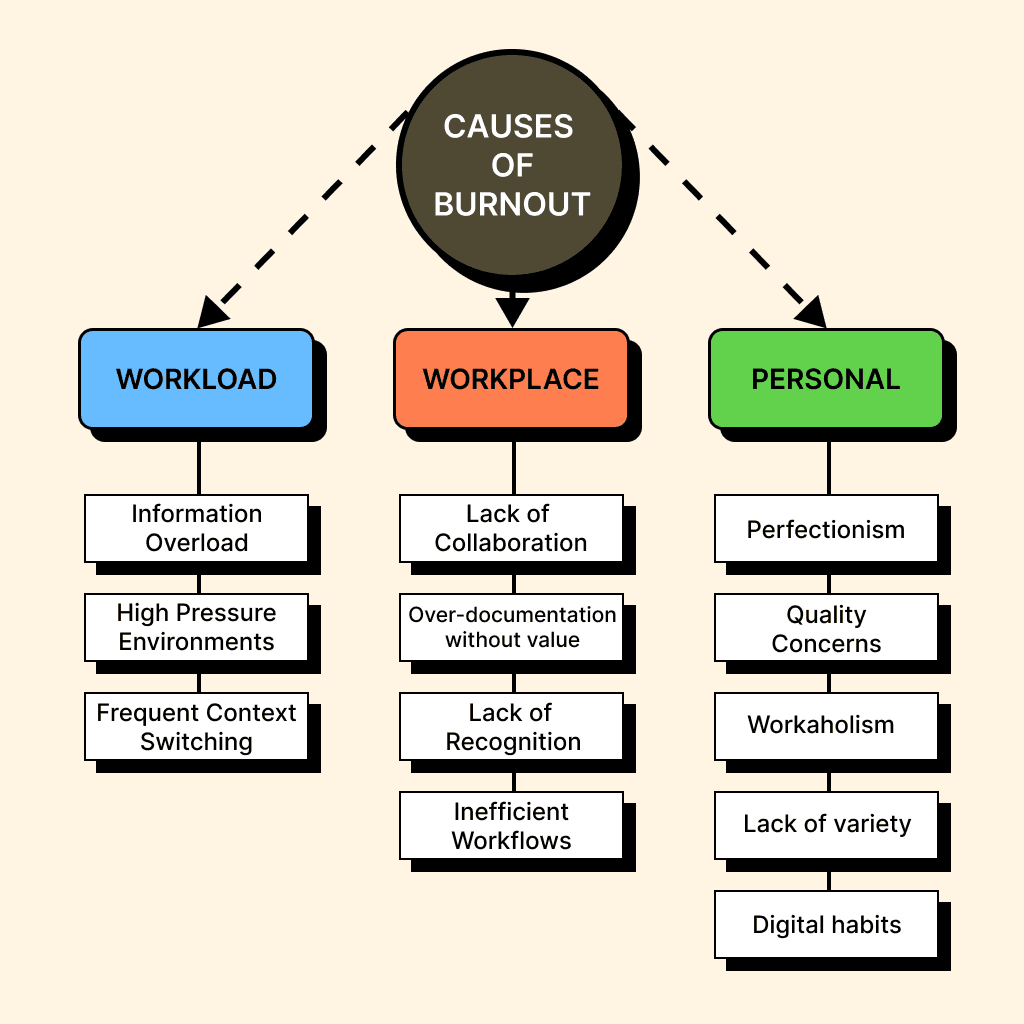
By understanding these connected factors, you can better identify your personal burnout risks and take steps to prevent them.
Workload challenges
Information overload: Managing large knowledge bases and keeping up with ever-changing products can feel overwhelming. Perfectionists may struggle even more, feeling the need to process every tiny detail.
High pressure environments: Tight deadlines and never-ending documentation backlogs can create a constant sense of urgency. When everything feels like it needs immediate attention, it’s easy to feel trapped in a cycle of stress.
Frequent context switching: Many documentarians juggle multiple responsibilities like writing, testing, coding, and explaining complex topics to both technical and non-technical audiences. Constantly switching between tasks can lead to mental fatigue and reduced productivity over time.
Workplace environment factors
Lack of collaboration: Poor team dynamics, micromanagement, or working in isolation can make documentation work feel exhausting. Without a support system, frustration builds up quickly.
Over-documentation without value: Too many review cycles or excessive documentation requirements can create unnecessary work without improving outcomes. When documentation becomes about process instead of impact, burnout isn’t far behind.
Lack of recognition: When work efforts go unnoticed or undervalued, it can lead to frustration and job dissatisfaction, especially for those who take pride in their work.
Inefficient workflows: Unnecessary planning cycles or overly complex approval processes can drain energy before actual writing even begins.
Personal and psychological factors
Perfectionism: Striving for flawless documentation is admirable, but it can become unsustainable, especially with high workloads and tight deadlines.
Quality concerns: Being forced to rush work or produce subpar documentation can feel discouraging. Over time, this disconnect between expectations and reality can lead to disengagement.
Workaholism: Pushing through long hours or skipping breaks may seem productive in the short term, but it quickly drains energy and leads to burnout.
Lack of variety: Even manageable workloads can feel draining if they become repetitive. Without new challenges or creative opportunities, engagement can fade.
Digital habits: Spending too much time on social media can make work tasks feel dull by comparison, reducing motivation and focus.
Prevention
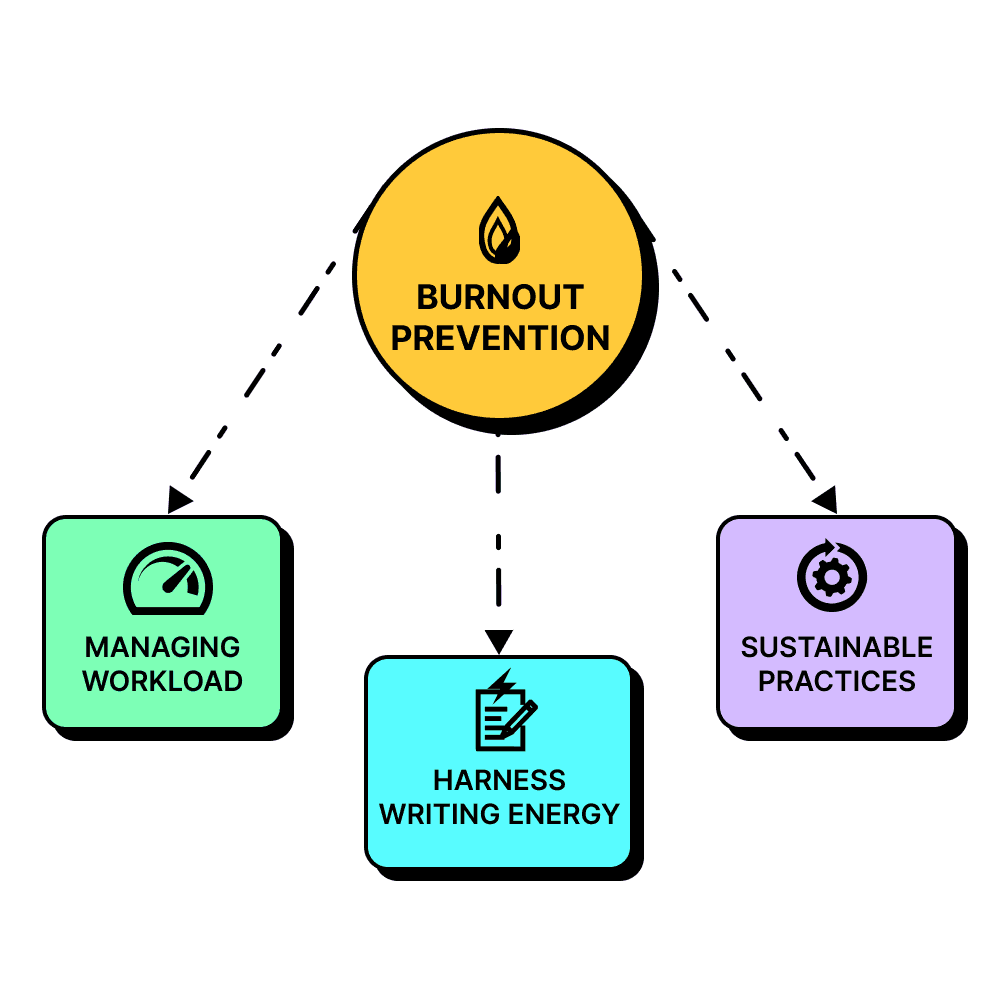
Once we understand the causes of burnout, we can develop effective strategies to prevent it. The following approaches are tailored specifically for documentarians.
Managing workload and setting boundaries
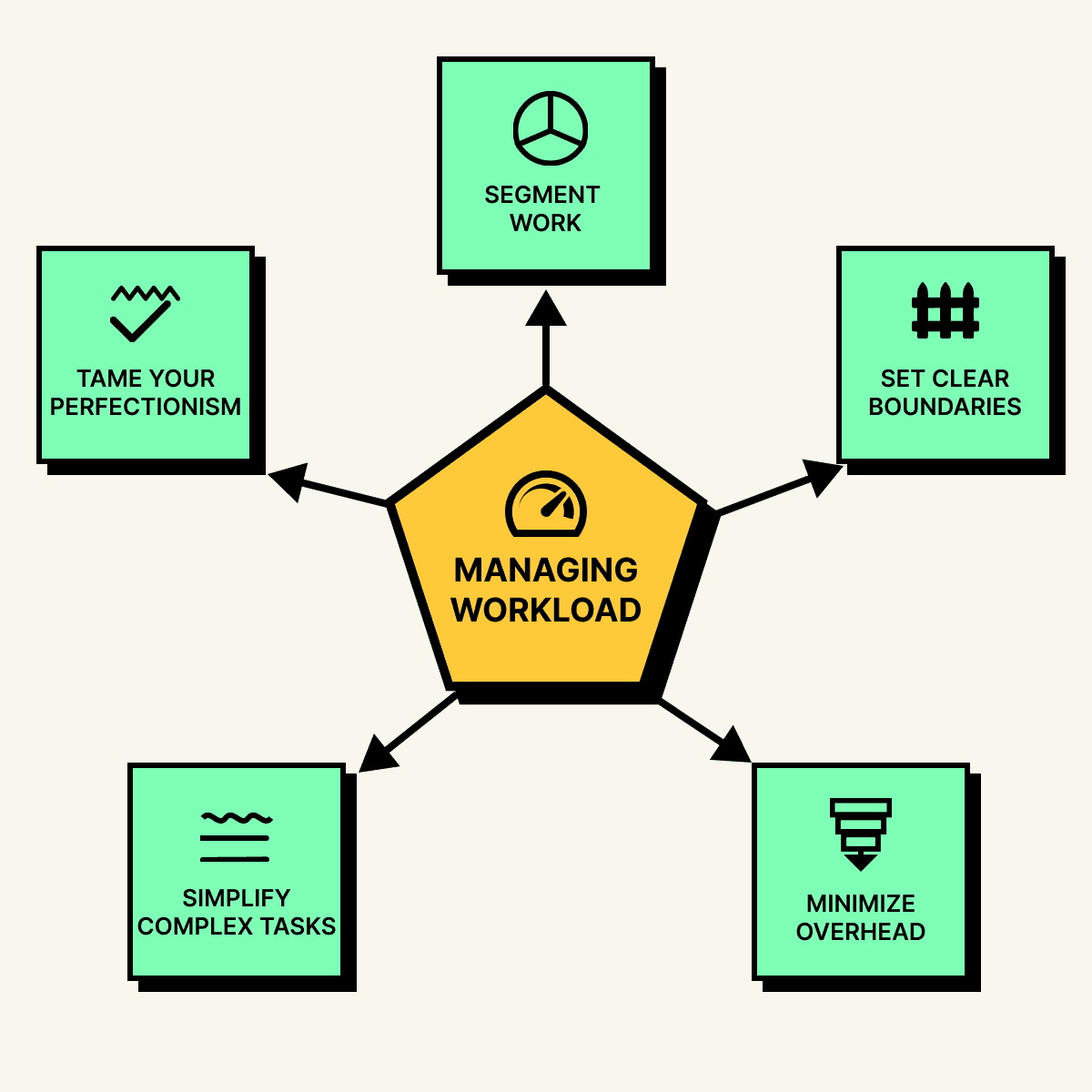
Tame your inner perfectionist
Perfectionism can be both a strength and a weakness. Instead of chasing exhaustive detail, focus on a well-researched but manageable approach. A document based on a few high-quality sources is often more effective (and sustainable) than a deep dive into dozens of references.
Break work into manageable chunks
Long documentation projects can feel overwhelming. Instead of tackling everything at once, break writing tasks into smaller, time-bound segments such as 30-minute work sessions. For example, when writing a user guide, treat each section as a separate task rather than trying to complete the entire document in one go.
Set clear boundaries with stakeholders
Managing expectations helps prevent work overload. Some ways to set boundaries include:
Keeping a visible task queue that shows your current workload
Negotiating realistic deadlines based on complexity
Documenting the time needed for different types of content to improve stakeholder understanding
Simplify complex tasks
If a project feels mentally exhausting, simplify it as much as possible. Reducing cognitive load makes documentation more manageable in the long run, even if it seems like extra work upfront. For example, document a feature by first listing its core functions, then adding advanced details gradually.
Minimize documentation overhead
Not every tool or process adds value. Avoid excessive workflows and focus on the essentials. This helps conserve mental energy for actual writing.
Adopting sustainable documentation practices
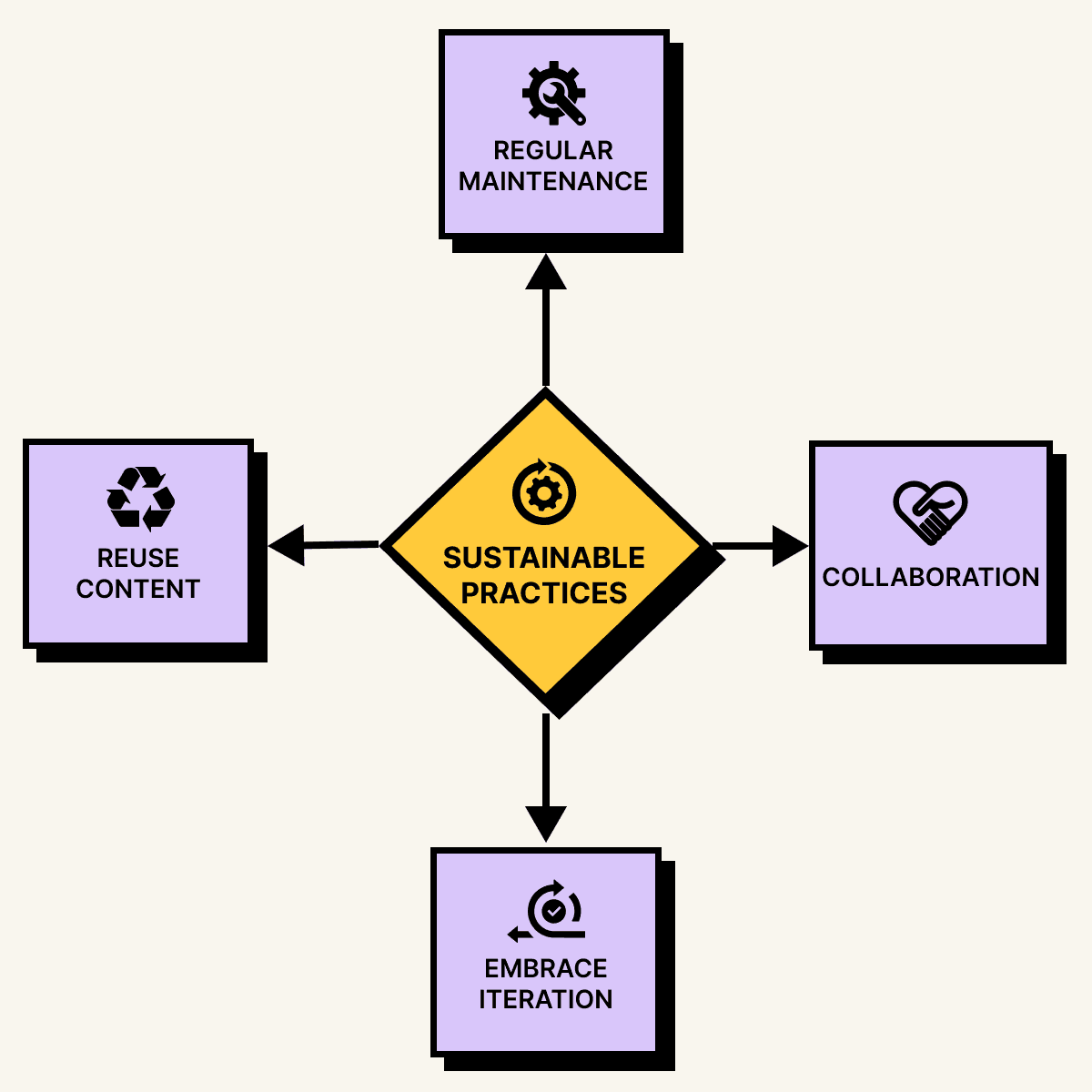
Embrace iterative documentation
Documentation doesn’t need to be perfect from the start. A “good enough for now” mindset allows you to publish useful content while refining it over time.
Reuse content when possible
Creating modular content such as reusable templates or standard procedures reduces repetitive work and speeds up documentation updates.
Collaborate with others
Pair writing can lighten the mental load and make the process more engaging. Structured collaboration helps bring fresh perspectives while distributing the workload.
Maintain documentation health
Instead of allowing outdated content to pile up, integrate documentation maintenance into regular workflows by:
Scheduling reviews alongside product updates
Sharing maintenance responsibilities among team members
Tracking documentation health with simple metrics
Harnessing writing energy effectively
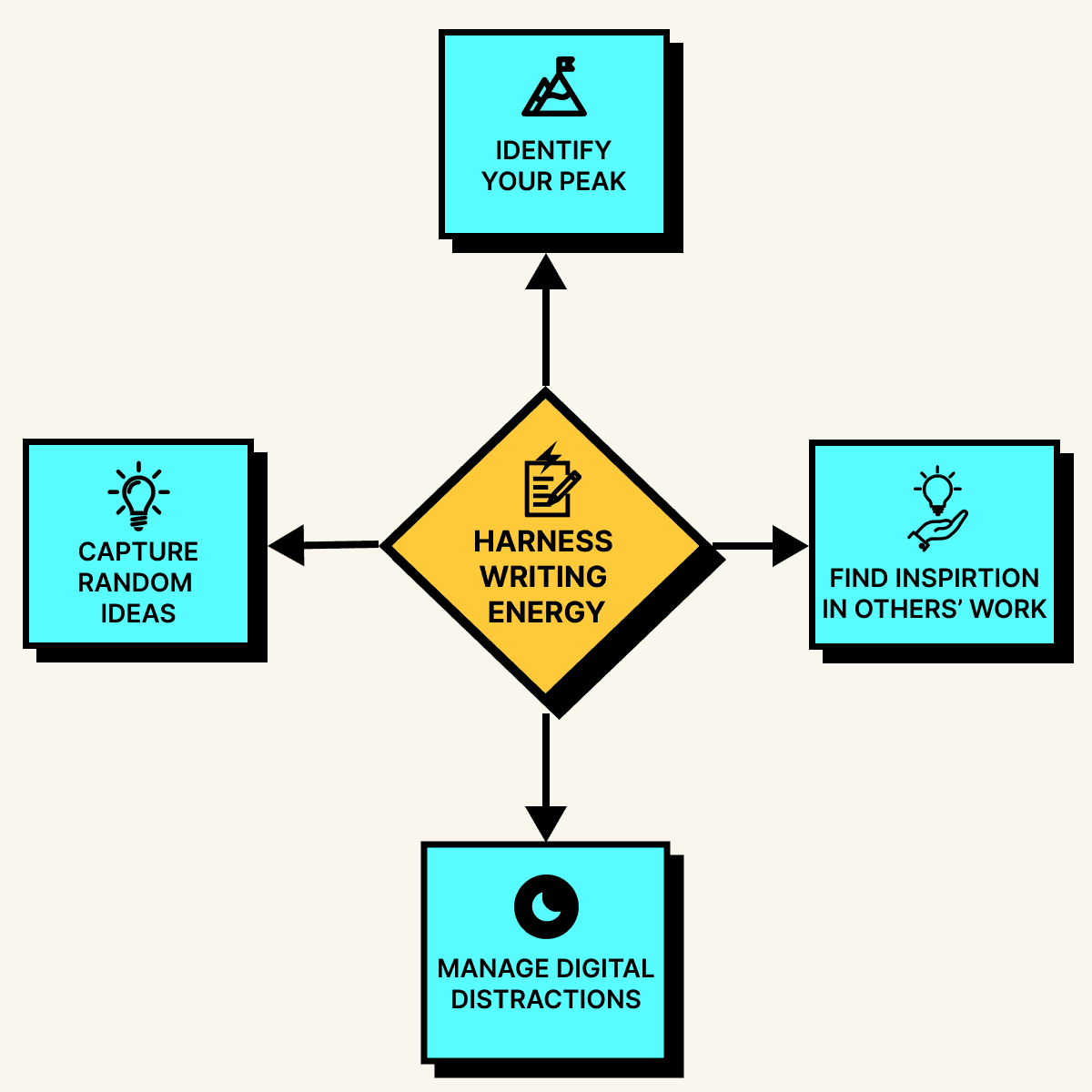
Identify your peak productivity times
Are you a morning lark or a night owl? Pay attention to when you are most focused and schedule high concentration work—such as creating new content—during those times. Reserve low energy periods for routine updates or formatting tasks.
Capture spontaneous ideas
Great documentation insights don’t always come while sitting at a desk. Keep a simple note-taking system handy to jot down ideas whenever they strike. These quick captures can provide fresh inspiration when you return to writing.
Find inspiration in great documentation
Reading well-crafted documentation from others can spark creativity. Observing different approaches to technical communication can help refine your own writing style.
Manage digital distractions
Be mindful of excessive social media and content consumption. Too much passive scrolling can drain energy, making documentation work feel even more exhausting. Focusing on creating rather than consuming helps maintain motivation.
Recovering from burnout
Burnout recovery isn’t just about resting. It’s about taking intentional steps to rebuild energy, reconnect with your work, and prevent future burnout. If you're already experiencing significant burnout, recovery requires a more structured approach than simply taking a few days off.
Recognize burnout early
Don’t wait until you’re completely exhausted. Common warning signs include:
Procrastinating on documentation tasks
Feeling mentally exhausted
Losing interest in writing
Struggling to focus
Avoiding documentation-related work
Noticing a decline in writing quality
Experiencing physical symptoms like headaches or tension
Feeling disconnected from your work
Assess the severity of your burnout
Understanding where you are in the burnout spectrum helps determine the right recovery approach:
Early-stage burnout: You're still functional but noticing warning signs. Recovery might take 1-2 weeks with intentional changes to your routine.
Moderate burnout: Work feels consistently difficult, and you're experiencing physical symptoms. Recovery might require 3-6 weeks of reduced workload and focused self-care.
Severe burnout: You feel completely depleted, may be having sleep issues, and work feels overwhelming most days. Recovery might take 2-3 months and may require professional support or extended time off.
Create a recovery plan
Negotiate immediate workload relief
Work with your manager to temporarily reduce responsibilities. This might include:
Postponing non-critical documentation projects
Focusing only on maintenance tasks rather than new content creation
Delegating complex projects to teammates
Taking on more collaborative work where others can share the cognitive load
Establish recovery routines
Build structure into your day that prioritizes restoration:
Set hard stop times for work (no documentation tasks after a specific hour).
Schedule regular physical activity, even if it's just a 10-minute walk.
Practice sleep hygiene: consistent bedtime, no screens an hour before sleep.
Engage in activities that require no decision-making (listening to music, gentle exercise, crafts).
Rebuild your relationship with writing
When you're ready to re-engage with documentation work:
Start with the smallest possible tasks (fixing typos, updating dates).
Set a timer for 15-20 minutes and stop when it goes off, regardless of progress.
Choose familiar, low-stakes projects to rebuild confidence.
Celebrate small completions rather than focusing on productivity metrics.
Step back before burnout worsens
When burnout signals appear, take action before burnout fully sets in. You could:
Take short breaks throughout the day (stretching, meditating, and/or walking)
Adjust your workload to reduce overwhelming tasks
Take a longer break if you need to reset and recharge
Reconnect with the physical world
The advice to “touch grass” has real benefits. Stepping away from screens and engaging in physical activities like walking, gardening, or exercise can help refresh your mind and restore focus.
For deeper recovery, consider activities that engage your senses differently than screen work:
Cooking or baking (tactile engagement with immediate results)
Gardening or tending to houseplants
Working with your hands (woodworking, knitting, drawing)
Spending time in nature without devices
Communicate with your team
If you are experiencing burnout, be open about it. Letting colleagues know what’s going on allows for adjustments and support. Most teams would rather give you space to recover than lose a valuable documentarian to burnout.
Frame the conversation professionally: "I'm experiencing some burnout symptoms and need to adjust my workload temporarily to maintain quality output. Here's what I'm thinking for the next few weeks..."
Know when to seek professional help
Consider professional support if you experience:
Persistent sleep issues or changes in appetite
Feelings of hopelessness about your career
Physical symptoms that don't improve with rest
Difficulty concentrating even on non-work activities
Strained relationships due to work stress
Many employee assistance programs offer confidential counseling specifically for work-related stress and burnout.
Ease back into work
When returning from a break, take a gradual approach:
Start with familiar, well-defined tasks to rebuild confidence.
Slowly take on more complex work as energy returns.
Set new boundaries to prevent future burnout.
Monitor your energy levels and adjust accordingly—recovery isn't always linear.
Create accountability systems: Work with a colleague or manager to check in weekly about workload and stress levels during your first month back.
Conclusion
Burnout among documentarians is preventable, but it requires intentional action before exhaustion sets in. The strategies outlined in this article—from managing perfectionist tendencies to setting clear boundaries—work best when implemented proactively rather than as emergency measures.
The key is recognizing that sustainable documentation practices benefit everyone: you maintain your energy and creativity, your team gets consistent quality output, and your organization builds better knowledge resources over time.
Start with one change today: Whether it's breaking a large project into smaller tasks, scheduling documentation maintenance alongside product updates, or simply acknowledging your peak productivity hours, small adjustments compound into significant improvements.
Remember that seeking support—whether from colleagues, managers, or mental health professionals—isn't a sign of weakness; it's a professional skill that helps you maintain the quality work your users depend on.
Your documentation serves others best when you're operating from a place of energy and engagement rather than depletion. By protecting your well-being, you're also protecting the quality of the knowledge you create and share.

Written by
Mark Munyaka
Mark Munyaka is a freelance technical writer with over 2 years of experience specializing in coding-related articles. His work has been published by notable tech startups including Strapi and Medusa. When not writing, Mark enjoys playing word games and gardening. Follow his latest articles on Medium and Dev.to.

Follow these 3 steps to improve your knowledge base
1
Get expert tips every month in your inbox
No spam, pinky promise.


2
Try the knowledge base software your team will fall in love with
Reduce tickets, make information easy to find.
Happier employees, happier customers.

3
Become the tech writer everyone respects
Check out our podcast, The Not-Boring Tech Writer.

How teams are using KnowledgeOwl
Loved by 3,200+ knowledge base authors in software companies around the world


























