
All articles
Feature spotlight: Synonyms
Use KnowledgeOwl's synonyms feature to enrich your knowledge base search.
Published
Category
Feature spotlight: Synonyms

Kate Mueller | October 15, 2020
One question most writers face regularly: how do I make sure people are finding the content they need?
I've seen customers add dozens of tags and search phrases to content, or play around with using different keywords throughout an article to try to ensure the article shows up when a variety of terms are searched. It's a tricky business, and let me save some of you a bit of time by shining the spotlight on a built-in feature that can help you optimize your search results: synonyms.
What are synonyms?
Synonyms are a sister feature to our search functionality.
We automatically index these article fields to return search results:
Title
Permalink
Body (all text in the editor)
PDFs (we automatically scrape and index PDFs under 100 pages; you can choose to index PDFs larger than 100 pages)
Meta description
Search phrases
Synonyms basically allow you to create a predefined synonym list for words that appear in any of those fields, and return articles that contain those synonyms rather than the term the reader actually searched. They're great for things like abbreviations, acronyms, or alternate spellings.
How synonyms work
In Library > Synonyms, you create an entry for each base word. This is the word you use in your documentation.
You can then add any number of synonyms for that base word. These are the equivalent terms your readers might be searching for.
You then reindex your search, so that those synonyms can be applied to the entire search index.
Here's a sample Synonym Library:
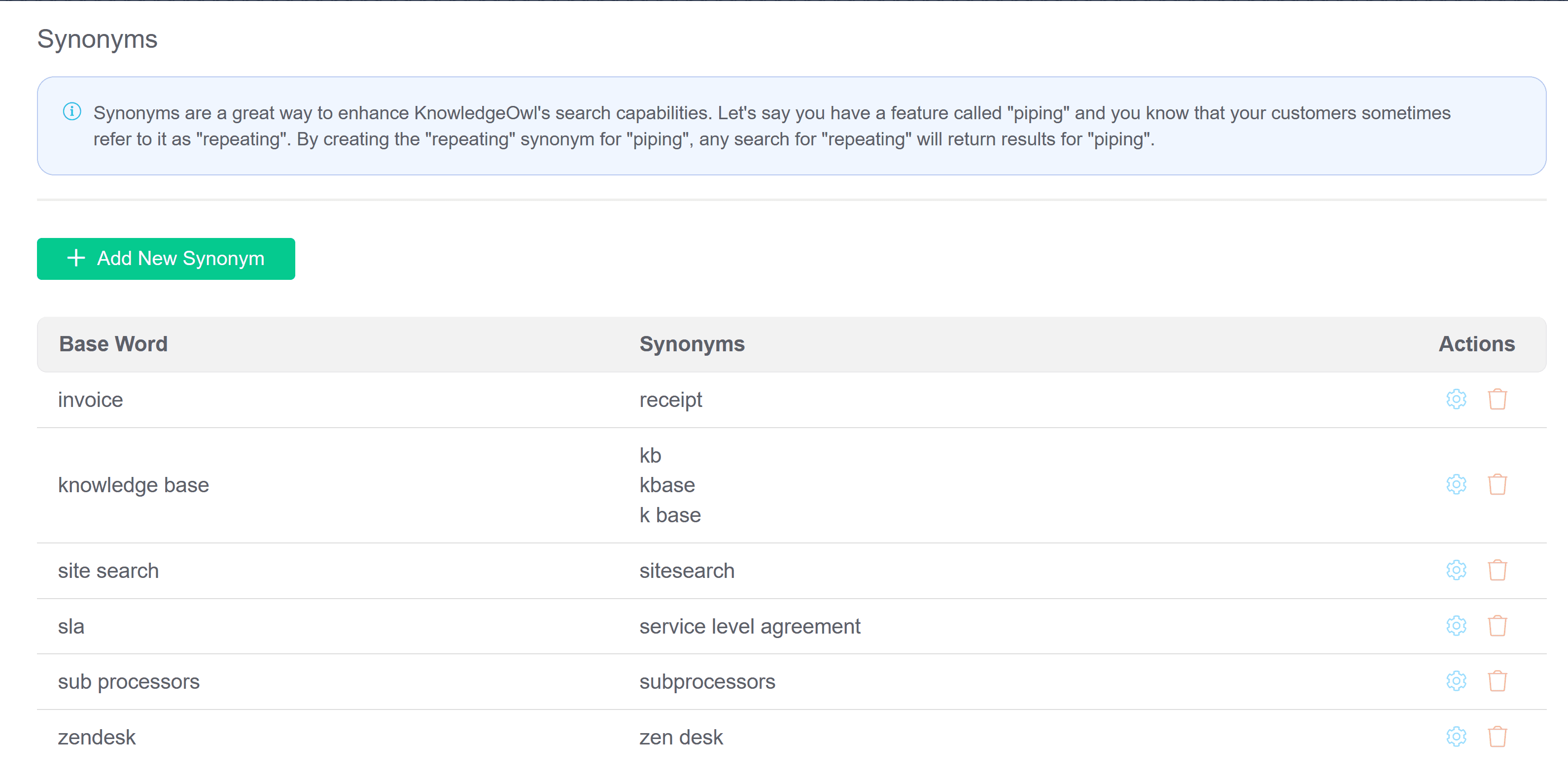
Sample synonym library
With synonyms, you can help your search handle direct equivalents (like "invoice" and "receipt" above), acronyms (such as "SLA" and "service level agreement"), and variations on words and phrases.
Once this reindex occurs, search itself becomes smarter.
Let's use one of our synonyms as an example: "knowledge base". This is, officially, always how we refer to knowledge base. Two words, fully written-out.
But over the years, we've had customers abbreviate this in a variety of ways, including "kb", "kbase" "k base" and "knowledgebase".
Without synonyms, if a reader searched for one of these terms, they probably wouldn't get much back, since we don't use those phrases in our documentation.
But once I've added those terms as synonyms for "knowledge base", a search for any of the synonym terms--like kbase--will return all articles that have "knowledge base" in them.
Automatically.
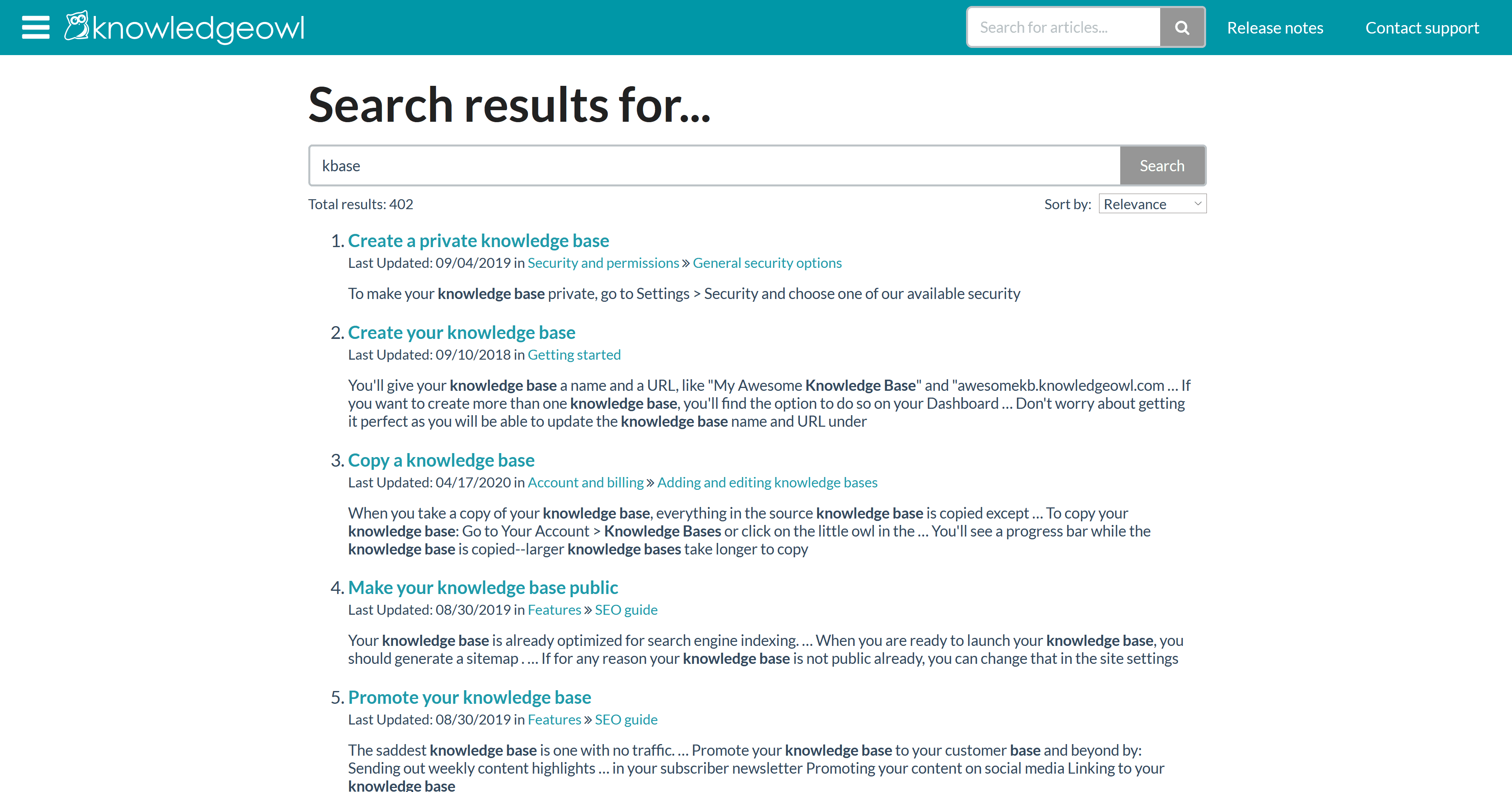
Sample search results when "kbase" is searched in our support documentation
Why use synonyms?
Hopefully you can already begin to see why Synonyms are awesome, but here's a deeper dive as to why we love them.
Reduce redundant and repetitive manual edits
Most other approaches to try to maximize search results involve a lot of repeated effort on individual articles, editing search phrases, article body text, metadata, and so on.
Synonyms are a one-and-done arrangement.
You create the base word + synonyms in the library, once. Once you reindex search, the synonyms will automatically be applied to all of your existing article content. You won't have to edit individual articles in any way to reap the benefits, and you won't have to depend on all your authors memorizing some convoluted set of steps to keep your search results well-tuned.
Help enforce consistent style guide standards
For most types of documentation, it's best to establish a standard set of terminology or phrases for how you describe things. For example, as mentioned above, one of our style guide standards is to always write out knowledge base as two separate words.
I like having a single, clear standard for our team, to help enforce consistency regardless of who's editing or creating content.
With synonyms, I can enforce that single standard while also leveraging a built-in feature to help handle the variations on our official style that we know customers use.
Subtly teach users
Look back at that screenshot of the search results for "kbase". Did you notice that the phrase "knowledge base" is the highlighted search term in each of those search results contextual blurbs?
Synonyms can be a subtle way of teaching your users about how your documentation works through the terminology you use. It's not a full-blown FAQ or a "what words mean in our documentation" write-up, but it's one more usage-based reinforcement of your official style guide/product terminology.
Can be easily added to existing workflows
Many tools like KnowledgeOwl give you ways to get insight into searches that returned no results. (Ours lives in the Reporting Dashboard.) This lets you discover terms your readers are naturally using--and not finding anything.
Sometimes those search terms can highlight gaps in your documentation. But sometimes they can also highlight the potential for new synonyms. Adding a synonym and reindexing sure beats having to manually update a dozen articles to include a new search phrase!
In case it isn't abundantly clear, I'm a huge fan of synonyms. If you're not familiar with the feature, check out our synonyms documentation and try them out today!
{{snippet.authorKateMueller}}
{{snippet.Disqus}}

Written by
Kate Mueller
Kate is KnowledgeOwl's Documentation Goddess & Resident Cheesemonger. She has led a checkered past, including teaching college-level English and being the head of product for another small software company. She LOVES cheese. In 2018, she hiked the entire Appalachian Trail, which inspired her to eat more cheese. At KnowledgeOwl, she writes our documentation and teaches Owlcademy classes and webinars. Outside of KnowledgeOwl, she advises on writing and documentation best practices as knowledge with sass and hosts The Not-Boring Tech Writer podcast. Connect with her on LinkedIn.

Follow these 3 steps to improve your knowledge base
1
Get expert tips every month in your inbox
No spam, pinky promise.


2
Try the knowledge base software your team will fall in love with
Reduce tickets, make information easy to find.
Happier employees, happier customers.

3
Become the tech writer everyone respects
Check out our podcast, The Not-Boring Tech Writer.

How teams are using KnowledgeOwl
Loved by 3,200+ knowledge base authors in software companies around the world


























