All articles
What are best practices for knowledge base articles?
Learn 8 best practices to ensure your knowledge base articles are consistent and easy to understand.
Published
Category
What are best practices for knowledge base articles?

Catherine Heath | January 20, 2021
So you’ve got your knowledge base up and running and you’re wondering how best to format your articles. It’s fantastic that you’re thinking in this much detail, because making your content accessible and actionable is key to the success of your self-service strategy.
Customers don’t have a lot of time to wade through excessive help content – they want to find the answer to their question or problem as quickly as possible. This means you have to pay careful attention to how you present information and put your reader at the centre of your writing.
Remember that customers are often under stress when they turn to your knowledge base, so think about how you would want the content to be structured if you were in their position.
1. Use the top-down approach to your article
You want to put the solution to the problem right at the beginning of the article if possible, ideally summed up in a sentence or two. You don’t want your customer to have to read right to the end of your article if the solution is something they could easily work out if pointed in the right direction.
Then, use the sequential approach to explaining the solution, so that means going through each point step-by-step. Number your steps so that customers can clearly see which task they need to complete next.
2. Clear, concise writing and formatting
It can be tempting to use flowery language when writing to make it more interesting but you must resist that impulse at all costs.
It’s just a best practice to keep your sentence structure and word choice as simple as possible in web writing to facilitate the habit of scanning rather than reading. Nowhere is this more important than when writing your documentation for your knowledge base.
You can train yourself to remove all assumptions made in your writing, so that while remaining succinct you can ensure that your meaning is transmitted most effectively.
Ensure that you space out the content within your articles so that your customers are not faced with the dreaded wall of text.
3. See it from the perspective of your customer
Try to use empathy to view the problem you are addressing in each article from the perspective of your customer. What level of expertise and experience are they likely to have? If at all possible, make use of customer personas so you can clearly visualize who you’re writing for.
Check our other article on the psychology of self-service: how to dazzle your knowledge base users for more information on this topic.
Also, try to eliminate writer bias in your writing – you know the product inside-out, but your reader is unlikely to have your level of knowledge. Run drafts past team members who are not so close to your products and services, such as administrators or office managers, to get a fresh perspective.
4. Consider different types of learning styles
Include lots of diagrams and videos to help explain your points. Think, how could I express this point visually rather than just using words? Using imagery with your content is a great way to bring it alive and help your customers to visualize the solution.
Screenshots in your documentation are a helpful tool for presenting the information in a visual way. Tools like Snagit help you create professional-looking screenshots that your users will love.
Also, if you have the capacity, consider making training videos for each article. Some people will prefer to watch a video tutorial rather than read an article, so your customers will really appreciate it if you give them that option.
5. Use anchor links in your articles
In order to convey the most information to your readers, sometimes your articles end up being quite long. You need to explain every step of every process to ensure your customer misses nothing out.
When you have longer articles in your documentation, you can include a table of contents at the top with anchor links to each section. Here’s an example from our own documentation:
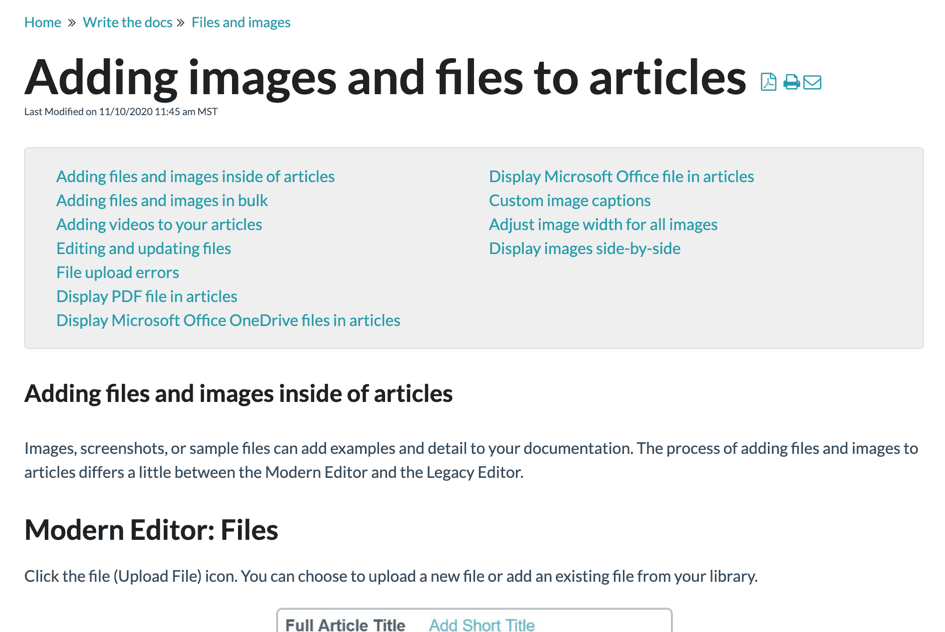
If you use a table of contents, this makes it easier for more advanced users to skip past the content they don’t need and go directly to a solution. You can even use table of contents in normal-length articles so customers can always skip right to the section they’re looking for.
6. Ensure your content is scannable
It’s likely that your readers are on the web and they’re not reading from beginning to end. Readers are going to skim articles quickly to find the information they need, and they will be put off by the great wall of text. If customers aren’t able to find what they need, their next step is going to be to abandon the knowledge base and contact support.
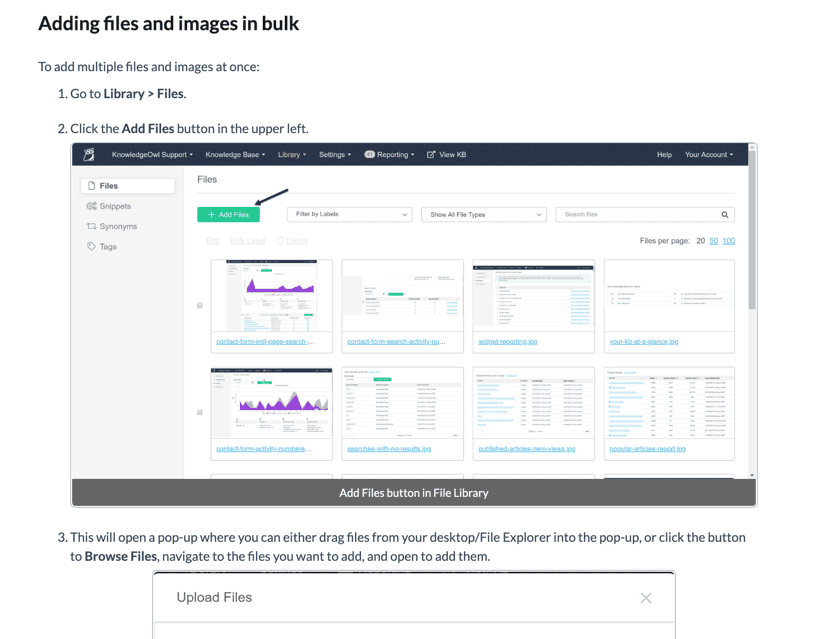
Make it easy for your readers to scan by breaking up text with subheadings and short paragraphs. Make use of call-outs, images and bullet points to further break up your text and improve the reading experience for your users.
Here’s an example from our own knowledge base using subheadings, images, numbered lists, and bold to refer to User Interface items.
7. Write your articles in a logical order
It makes sense to design your documentation around how readers are actually going to be using the workflow. Don’t confuse them by arranging information randomly. Organize your article into chronological order with the first thing customers should do labeled as step one.
On the other hand, chronological order doesn’t always make sense for your articles. In that case, it might make sense for any number of steps to be step one. If you find yourself in this position, organize your content by choosing the easiest steps first. If content is too difficult at first, you risk your customers abandoning your article and firing off a message to support.
Finally, be mindful of your user’s workflow – don’t interrupt your steps with too much extra information that distracts from the task at hand. Instead, you can include a “related articles” section at the end of your article to take users to more content.
8. Interlink your articles
When you write your knowledge base article, you’re sure to come up with plenty of content ideas that relate to the topic you’re writing about. It’s good practice to write each article based around one topic only, so this is where interlinking comes into play.
Use your links to take your customers to other helpful information without rewriting it in the current article. This is especially helpful for users who may not be as experienced with your product, and would benefit from learning more.
You don’t want to assume that your customers have too high a level of experience, and that’s why interlinking comes in so handy because customers can learn more – without you having to include all that extra information in your article.
Summary
As long as your articles are consistent and they are easy for your customers to understand, you’ll be on the right path. Make your content clear and concise, and format your articles properly to be on the way to self-service success.
Of course, that’s easier said than done, but a willingness to keep improving and reviewing your content will help to ensure you are sticking to knowledge base best practice in your articles.
Our KnowledgeOwl knowledge base software makes it super easy to follow best practice guidelines when writing your documentation. If you’d like to trial KnowledgeOwl in your company, don’t hesitate to get in touch with us today.
{{snippet.authorCatherineHeath}}
{{snippet.Disqus}}

Written by
Catherine Heath
Catherine is a freelance writer based in Manchester who writes blogs, social media content, and copy. She also designs owl-based images. 🦉

Follow these 3 steps to improve your knowledge base
1
Get expert tips every month in your inbox
No spam, pinky promise.


2
Try the knowledge base software your team will fall in love with
Reduce tickets, make information easy to find.
Happier employees, happier customers.

3
Become the tech writer everyone respects
Check out our podcast, The Not-Boring Tech Writer.

How teams are using KnowledgeOwl
Loved by 3,200+ knowledge base authors in software companies around the world