
All articles
The hidden gap between knowing and writing it down
The people who know your processes best are the least likely to document them. Here's how to close the gap with reverse engineering, lightweight notes, and team habits that actually stick.
Published
Category
The documentation conundrum
People closest to a task are the best equipped to document it. But they’re also the least likely to do so. Both academic and non-academic writing have covered the burdensome nature of documentation despite its tangible benefits. The work feels intuitive, almost obvious, and writing it down can feel like documenting how to breathe. The result is a knowledge base full of gaps, a support team that struggles when key people are out, and new hires piecing together tribal knowledge from Slack threads.
This article explores how to approach documentation, overcome individual and team-wide barriers, and foster a documentation culture.
Reverse engineering decisions
When an expert works on something, it often feels intuitive, almost obvious. A step-by-step approach can feel slower. But are they actually skipping steps, or are those steps embedded in their thinking? What’s often needed is reverse engineering to unpack this. Once a task is completed, it helps to ask: What was the goal? What did you do first? What decisions and assumptions were made? Where could someone get stuck?
Let’s turn to an example: a support agent resolves a tricky ticket where a customer’s data isn’t syncing after an account migration. The intuitive version is: “I figured out it was a caching issue and fixed it.” But if they were to share their process with other agents, the reverse-engineered version might look like this:
Step 1: Check whether the sync error is account-wide or limited to specific records.
Step 2: Verify the migration completed successfully (admin panel > migration log).
Step 3: Rule out permissions issues by confirming the user’s role and access level.
Step 4: Clear the account cache and trigger a manual re-sync.
Step 5: If the issue persists, escalate to engineering with the migration log ID and error timestamps.
This turns a one-off skill into a repeatable method. But steps don’t always suffice; sometimes, we need to understand the judgment behind them.
The storytelling approach
If reverse engineering captures the steps, storytelling explains why those steps exist.
Here’s an example: A senior support agent was working on what looked like a routine password-reset ticket when the customer wrote, “I keep getting locked out of my account.” A less experienced agent might have reset the password and moved on. But this agent picked up on the word “keep” and checked whether the customer had multiple accounts under the same email. They found duplicates, merged them, and resolved the actual problem.
If this worked because of the agent’s prior experience, how do we make sure other agents can spot it too? The story’s arc can be broken down as:
Trigger → Pattern → Constraint → Example
This structure turns a personal anecdote into a reusable teaching tool:
Trigger: A phrase in a customer message that hints at a deeper issue
Pattern: “Keep getting locked out” often signals duplicate accounts or session conflicts, not a forgotten password
Constraint: Investigate root cause before applying the standard fix
Example: A ticket where the wording suggests repetition or frustration
Now, another agent doesn’t need the original ticket to replicate the approach. They can look for moments where the surface request ≠ the underlying issue, and turn those into scenarios the team can reuse.
To make this more actionable, here’s a quick way to match documentation type with approach:
Type | What it includes | Best way to document |
|---|---|---|
Processes | Step-by-step workflows to complete tasks (e.g., resolving tickets, publishing content) | Use numbered steps and decision points; include edge cases |
Systems | How tools, platforms, or features work (e.g., billing logic, permissions) | Combine diagrams or flows with short explanations, focusing on “how” things behave |
FAQs | Recurring user or internal questions | Keep answers concise and scenario-based, mirroring real phrasing |
Playbooks / Scenarios | Judgment-based situations (e.g., handling frustrated users, tricky edge cases) | Use storytelling to capture reasoning and implicit signals |
Documentation doesn’t have to feel heavy
Even with the right approach, documentation fails if it feels humongous. But what if a “document” were just a sticky note? Going back to the example above, even a rough note like…:
“locked out + duplicate accounts??? merge fixed it”
…already constitutes documentation. Over time, this can be refined into a help article with the steps fleshed out: 1) Identify duplicate accounts, 2) Confirm ownership, and 3) Merge accounts via admin panel.
Notice how nobody sat down to “write documentation.” It evolved organically. The moment your team treats rough thinking as documentation, the barrier drops.
Using AI without losing ownership
The same logic ("lower the barrier, then refine") applies to AI. Used carelessly, AI can quietly take ownership away from the people who know the work, producing documentation that sounds polished but misses the judgment behind their decisions. Used well, it lowers the barrier further: it can turn a sticky note into a skeleton your team can fill in.
The trick is in the prompt. Asking AI to write the documentation for you tends to produce confident-sounding output that hides the gaps. A simple framework that works better:
"Give me a structured outline/skeleton for [task]. Keep it high-level and do NOT fully complete it. Insert clear placeholders (e.g., [ADD CONTEXT], [YOUR ANALYSIS], [DATA NEEDED]) wherever my input is required. If assumptions are needed, label them explicitly."
If you compare versions where AI was asked to develop documentation before and after the framework was applied, the difference is striking. The "before" version reads as finished but is full of generic claims. The "after" version is rougher, but it leaves room for the team's expertise, which is where good documentation comes from.
Making documentation a team habit
So far, we’ve looked at how individuals can unpack their thinking. But how do we make this scalable across a team?
One approach is a shared tracker with simple fields such as the following:
Customer issue | Root cause | Resolution steps | Recurring? | Help article? |
|---|---|---|---|---|
User unable to log in | Duplicate accounts created with same email | Identify duplicate accounts → Confirm ownership → Merge accounts via admin panel | Y | Y |
Incorrect billing amount | Plan upgraded mid-cycle without prorated adjustment | Verify billing history → Adjust invoice manually → Notify user | N | N |
This makes it easy to record observations and reinforces fairness: everyone can see their team members’ contributions. Patterns emerge, forming a documentation pipeline; a recurring issue noted in the tracker can make its way to an FAQ document. A shared tracker also enables lightweight metrics such as each person’s number of entries.
Alternatively, teams can introduce shadowing sessions where members document each other’s work on a rotating basis. Breakout rooms or semi-formal team catch-ups can be used as well: members list the steps they follow in a relay format, one after the other, until someone points out a variation, such as “Oh, I usually confirm user permissions before troubleshooting rather than after,” revealing alternative workflows that can be captured as branching paths or flowcharts.
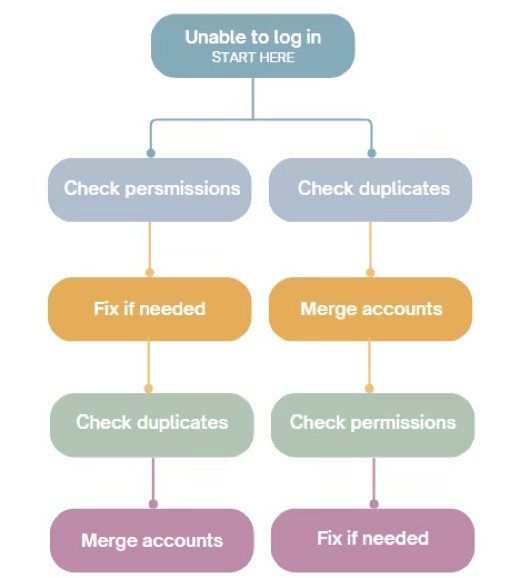
Another lever is repurposing documentation across teams. The instructions a delivery team follows internally often mirror what is promised to clients externally. Training materials, internal SOPs, and customer-facing help articles can draw from the same source, adapting for audience and tone. This ensures consistency while reducing effort.
Onboarding can also play a role. Trainers can routinely ask new hires questions like “How did you solve this?” to encourage them to articulate their processes. Their fresh perspective catches gaps that tenured employees can no longer see.
Over time, this turns documentation into a shared system.
Incentivizing documentation
Even the best systems work only if people are motivated.
Rewarding employees for thinking aloud, not just for providing solutions, makes a difference. It encourages reflection, the heart of documenting processes. It also helps to reinforce practices like documenting while working (on the go) and creating quick logs or voice notes.
If we frame it as a way to avoid answering the same question repeatedly, resolve tickets faster, or reduce burnout when creativity dips, teams are more likely to see the value they create through documentation.
Managers are key in making impact visible. It can be as simple as a conversation over coffee: “That guide you wrote is now used in onboarding. It saved about five hours this week.” Or: “Your doc was viewed 120 times this month.” Managers can also reference documentation in their own work, rather than waiting for others to cite it. When people see impact, documentation stops feeling like extra work.
Start where you are
You don’t need a documentation overhaul. You need one person to jot down how they resolved a tricky ticket, a shared place to put it, and someone to notice when it helps. The gap between knowing and writing it down is real, but it’s smaller than most teams think.

Written by
Hema Thakur
Hema Thakur is an independent researcher and academic mentor with over a decade of experience guiding editors and authors toward publication in top-tier journals, including Nature. Her work spans multiple academic platforms and major news outlets. An active voice in the research community, she's also a TEDx and academic conference speaker.

Follow these 3 steps to improve your knowledge base
1
Get expert tips every month in your inbox
No spam, pinky promise.


2
Try the knowledge base software your team will fall in love with
Reduce tickets, make information easy to find.
Happier employees, happier customers.

3
Become the tech writer everyone respects
Check out our podcast, The Not-Boring Tech Writer.

How teams are using KnowledgeOwl
Loved by 3,200+ knowledge base authors in software companies around the world


























