
All articles
Seamless transition: Migrating your documentation to KnowledgeOwl
Learn how to migrate your documentation to KnowledgeOwl and lay the foundation for an organized and effective knowledge base.
Published
Category
This is the first of three articles that will comprehensively cover all of the stages of migrating documentation to KnowledgeOwl. Not only will this series explain how to migrate your documentation, it will also explain how to optimize KnowledgeOwl to your fit your needs.
Planning your migration
People value information because it allows them to complete tasks and make decisions. A knowledge base is designed to effectively organize information, which maximizes the accessibility and usefulness of information.
A knowledge base is more than just a collection of documents; it is a repository designed specifically for the navigation and exchange of information. It does not leave consumers to fend for themselves; instead, it compiles all important information into a single location, ensuring that relevant information is never far away. In essence, it is an efficient method of obtaining information that allows users to quickly find answers to questions or get insights into a subject.
KnowledgeOwl is a knowledge base software tool that makes it easy to create, update, and find information in one centralized, secure location. Here's a summary of some of KnowledgeOwl's notable features and benefits:
Search functionality: KnowledgeOwl has advanced search capabilities that allow users to quickly find the information they need. When you add new information to your knowledge base, it is automatically indexed so it can be easily retrieved by user searches. When users input a search query, a dropdown list of 10 appropriate autosuggestions appears based on the user's input. KnowledgeOwl also has a comprehensive search functionality, which factors all indexed fields and displays them based on an efficient ranking algorithm.
Check out this SEO guide to learn how to enhance the findability of the content in your public knowledge base.
Ease of organization and navigation: KnowledgeOwl makes organization simple by allowing you to sort articles in a variety of ways. For example, Tags and Categories enable various filters that help with content access and navigation.
Collaboration with KnowledgeOwl is simple and secure. It enables numerous team members to create and update documentation at the same time. Earlier versions can be readily reverted to if needed thanks to robust version control features. Different levels of access permissions can be easily granted to any user.
Analytics: At the time of this writing, KnowledgeOwl does not yet* have its own built-in analytics tool, but if you need analytics, there are integrations with several third-party analytics systems available, such as Google Analytics, PostHog, Plausible, Matomo, and others.
*Editor's note: KnowledgeOwl is working on a new reporting and analytics suite that they hope to roll out in 2025.
With all of these incredible capabilities and more, it is clear why KnowledgeOwl should be the destination for whatever knowledge you need to share.
Background
In this series, we will be migrating the Documentation for NBA-API Package to KnowledgeOwl.
Some pain points of the current documentation hub:
It is difficult to collaborate. The documentation is housed on GitHub sites, which makes it difficult to work on multiple projects at the same time, and there is no straightforward mechanism for contributors to suggest improvements and provide comments.
Search phrases are only matched to headers, titles, and metadata; therefore, search functionality is limited. It is not very good at dealing with specificity.
The documentation is organized in a flat hierarchy of Markdown files. This complicates navigation and organization. Nesting pages, grouping related concepts, and connecting related sections are all complex processes.
The documentation is available on GitHub and is hosted by Netlify. The knowledge base contributors have no control over the analytics, hosting, uptime, or features because they do not have complete ownership of the knowledge base.
There is no built-in user feedback mechanism—such as upvotes or comments—to help understand and improve user pain points. This makes it difficult to develop improvements based on customer feedback.
Setting up KnowledgeOwl
Thankfully, the existing Documentation for NBA-API Package can remain online while I migrate it to KnowledgeOwl. The existing documentation also serves as a secure back up.
If your existing documentation cannot remain online and available during the migration process, it is important to give your users a heads up so they can prepare for the offline hours and any potential problems that could arise from temporarily losing access to your knowledge base.
The first step is to migrate to KnowledgeOwl is to create a KnowledgeOwl account. KnowledgeOwl's comprehensive Getting Started Guide is an incredibly helpful resource to reference during your initial set up phase.
Now I'm going to go over the steps I took to migrate the original NBA-API Package documentation to KnowledgeOwl.
Creating the Home Page
All of the following sections in the original NBA-API documentation must be set up in KnowledgeOwl:
Home Page
Static Module
Endpoints
Nested Endpoint Categories
Examples and Tutorials
Contact Page
As seen in the figure below, when users are logged into KnowledgeOwl, they have access to a navigational sidebar that allows them to do various things. For example, the "View KB" button takes users to the the public-facing side of their knowledge base.

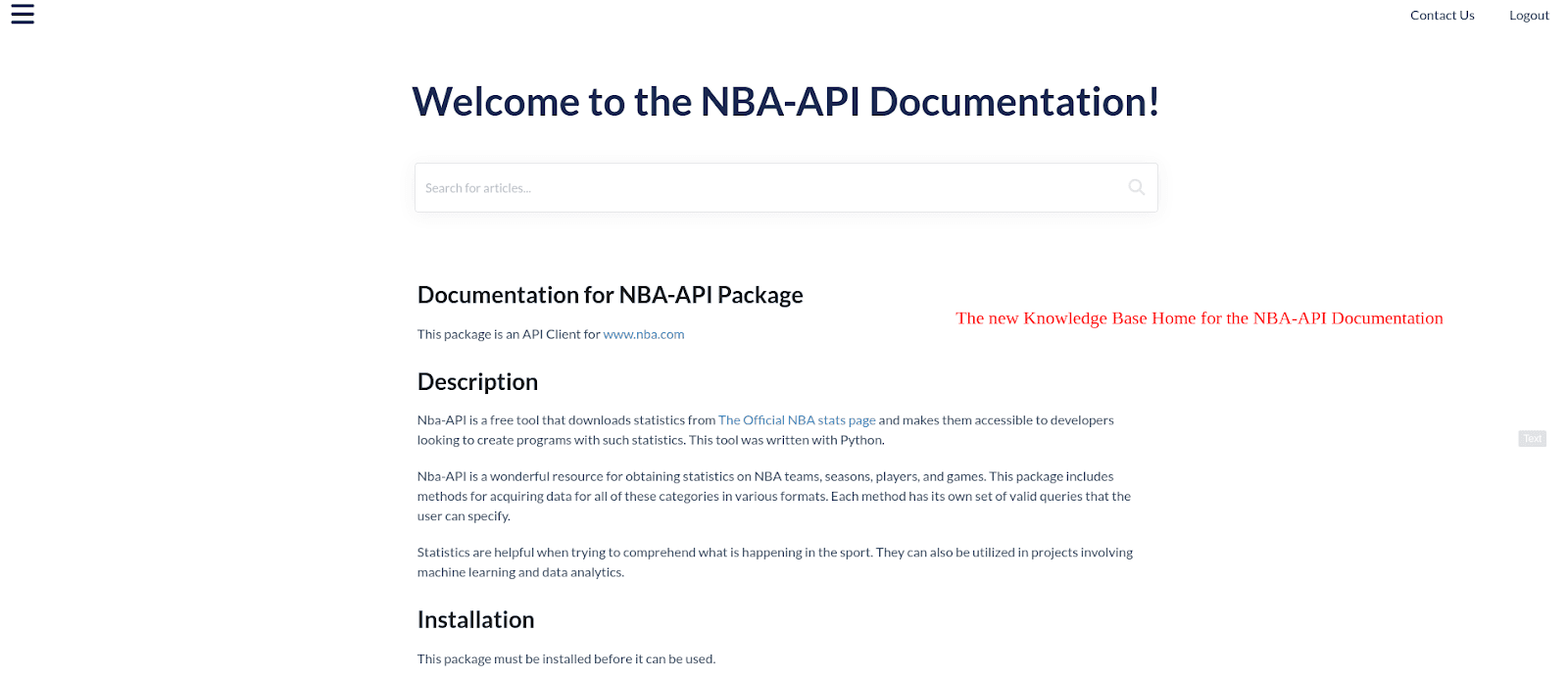
The first thing I did in KnowledgeOwl was update the "Home Page." To do this, I clicked the "Home Page" link in the sidebar and populated it with the content from my existing knowledge base's home page.
You can see the public-facing view of the NBA knowledge base Home Page in the image below:
Creating other categories
Next, I created categories for the other four sections. In KnowledgeOwl, a category is a folder or container for articles.
Click "Articles" in the sidebar, then click the "Add Your First Category" button to trigger the "Add Category" popup window to appear (shown below).
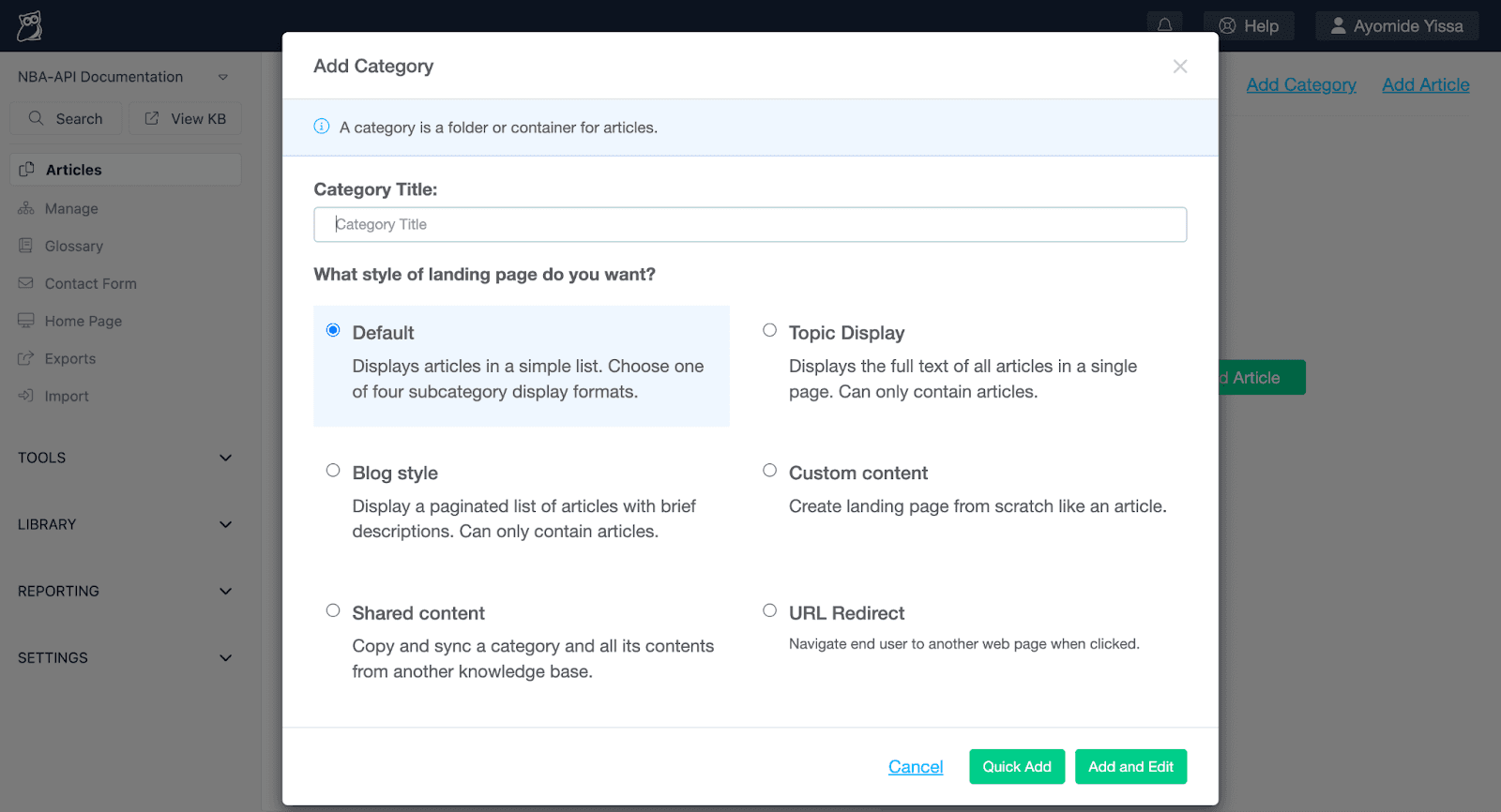
After entering the category title, you can select the page style you want and then click "Add and Edit." Alternatively, you can click "Quick Add" to skip the category edit page that's shown in the screenshot below:

After I completed the aforementioned category creation steps for all of the four main sections, the categories appeared as "Top Level Content", as shown below:
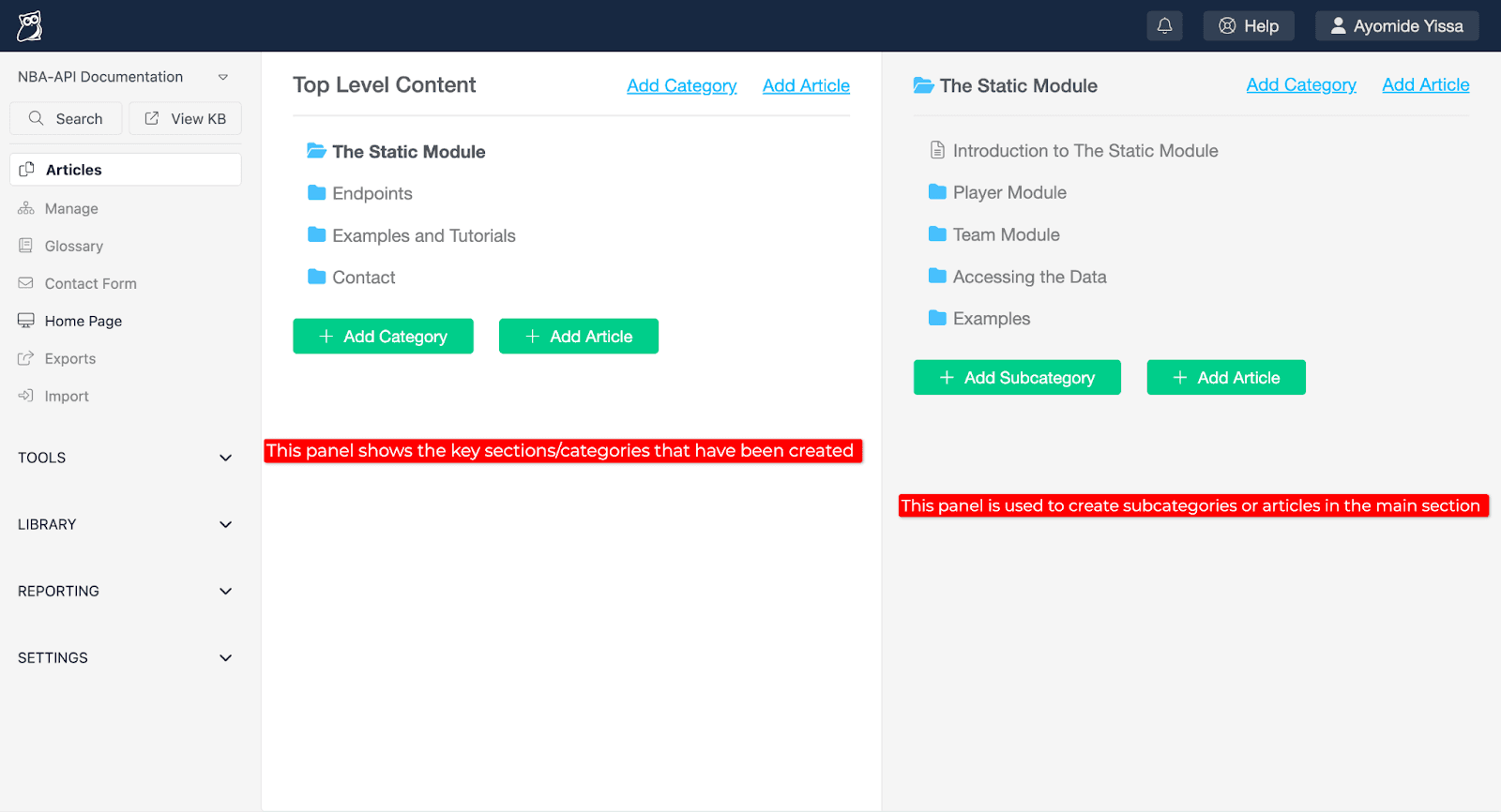
Subcategories and articles can also easily be created by clicking the "Add Subcategory" and "Add Article" buttons.
Conclusion
This article covered the initial steps for setting up a knowledge base in KnowledgeOwl.
Now that the basic framework has been established, the next step is to begin transferring the content of the pages to the new knowledge base, which will be covered in the second article in this series.
The initial migration process will take time and effort, but once it is completed, it will be easy to keep your knowledge base up-to-date and relevant thanks to KnowledgeOwl’s user-friendly interface and rich feature-set.

Written by
Ayomide Yissa
Ayomide Yissa is a technical writer who specializes in clearly and concisely communicating complex concepts. Throughout his career, he’s honed his skills in producing excellent product documentation, developer guides, API docs, and web content for niche companies across multiple industries. Notably, he’s documented APIs for sports and fintech products and set up documentation workflows for product teams. He’s also contributed to open-source projects by improving the usability and readability of open-source technical documentation.

Follow these 3 steps to improve your knowledge base
1
Get expert tips every month in your inbox
No spam, pinky promise.


2
Try the knowledge base software your team will fall in love with
Reduce tickets, make information easy to find.
Happier employees, happier customers.

3
Become the tech writer everyone respects
Check out our podcast, The Not-Boring Tech Writer.

How teams are using KnowledgeOwl
Loved by 3,200+ knowledge base authors in software companies around the world


























