All articles
Your support queue is a documentation audit. Here's how to read it.
Learn how to mine support tickets for documentation gaps and build a feedback loop between support and docs that reduces ticket volume.
Published
Category
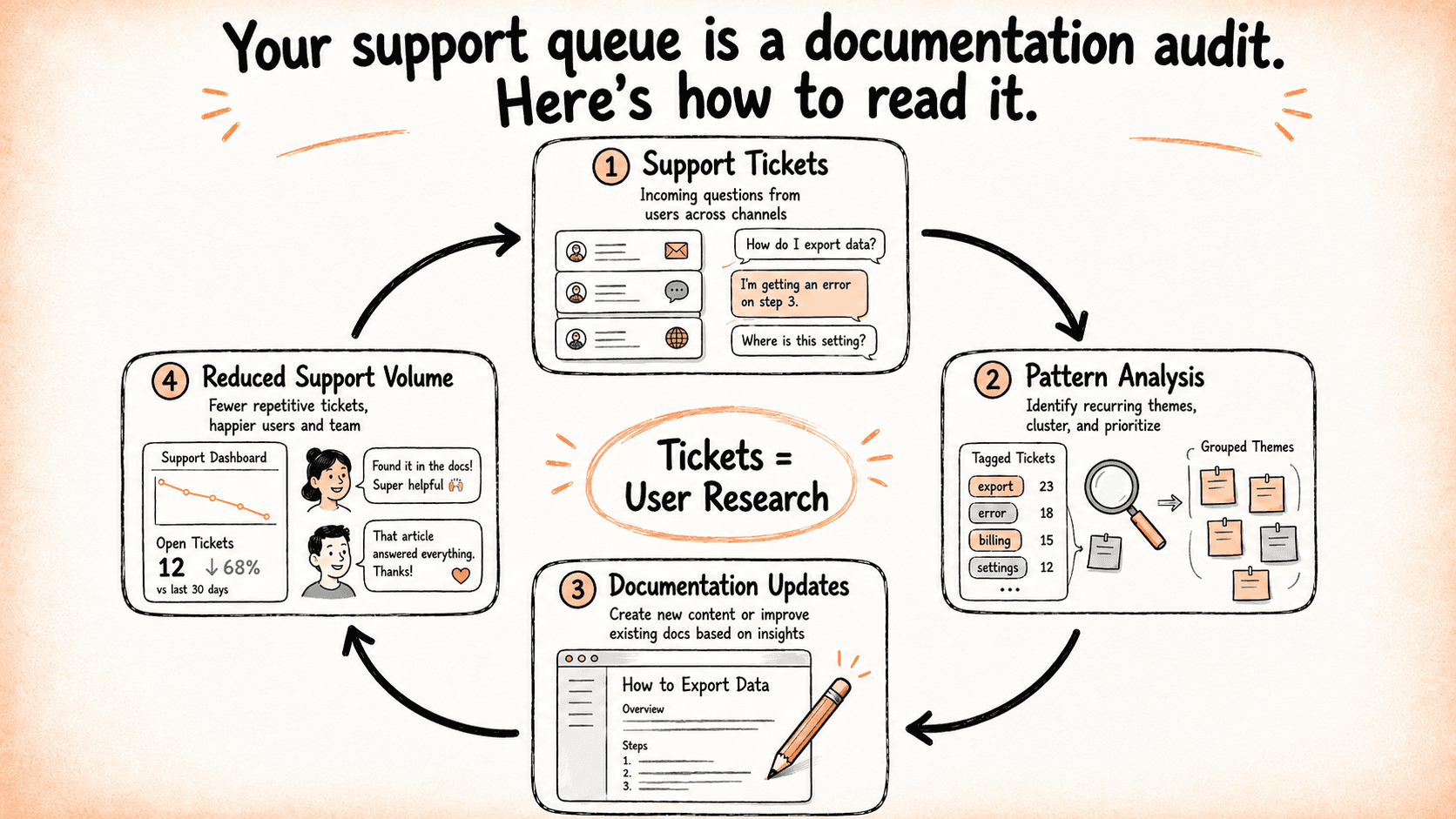
Your support queue is a roadmap for improving your documentation, showing where users run into missing, unclear, or incomplete guidance, and how those gaps affect their ability to move forward.
Key takeaways
Support tickets often show where documentation has gaps: what users couldn't find, couldn't understand, or couldn't act on.
Mining tickets systematically turns reactive support work into a proactive documentation improvement cycle.
The goal is to identify patterns that point to structural gaps. A tight feedback loop between support and docs reduces ticket volume faster than more thorough documentation alone.
The gap between support queues and docs ownership
Every ticket that could have been resolved by documentation points to a gap. The user had a question or a problem, looked for an answer, and still reached out for help. These support interactions help understand exactly where the documentation experience breaks down.
The catch is that most teams aren't reading it that way. Support queues and documentation tend to be managed as separate projects with separate owners, separate metrics, and separate definitions of success. The teams with the strongest knowledge bases, however, treat them as one system.
This article covers how to read tickets as documentation feedback, what patterns to look for, and how to build a loop between support and docs that makes both functions better over time.
Mining your ticket queue for documentation gaps
Tickets tend to cluster around a few gap types, and recognizing which type you're dealing with changes what you do next.
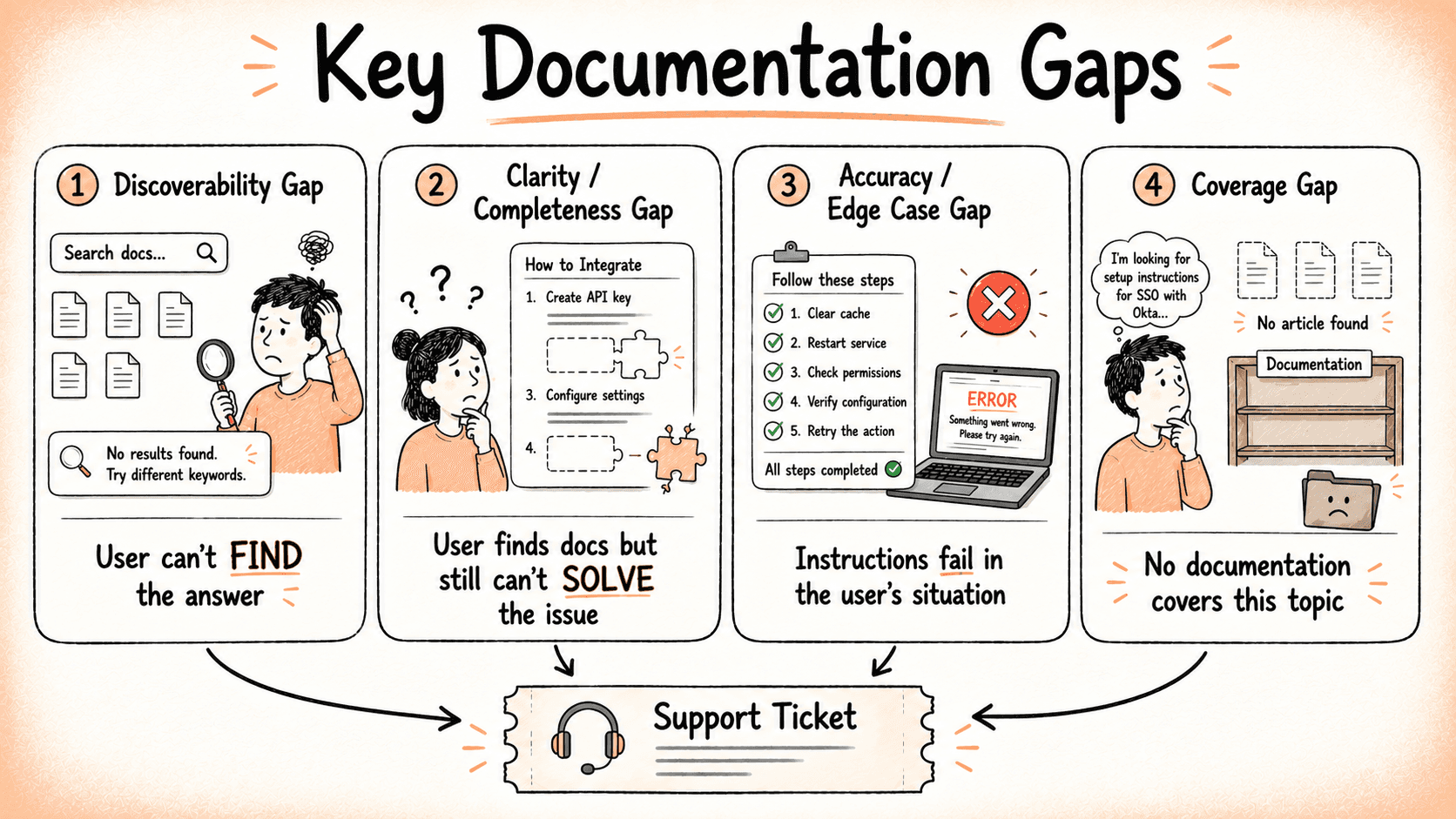
The first is a discoverability gap: the user couldn't find the answer. An article may exist. It may even be good. But it didn't surface when the user needed it, so they gave up and opened a ticket instead.
The second is a clarity or completeness gap: the user found something relevant but it didn't actually help. Maybe the article assumed too much prior knowledge, skipped a step, or addressed a slightly different version of their problem. Either way, they left the docs without an answer.
The third is an accuracy or edge case gap: the user followed the instructions and something still went wrong. This might mean the docs are out of date, or that they cover the standard path but not the variation this particular user ran into.
The fourth is a coverage gap: the user is looking for information that simply doesn't exist in the documentation. There is no relevant article, guide, or reference material covering the topic, so the user has no documentation path to follow and must open a ticket for help.
To summarize:
Gap type | What happens | Why the user opens a ticket |
Discoverability gap | The docs fail to surface the right answer at the right time. | The user can’t find the information they need. |
Clarity or completeness gap | The docs explain the issue poorly or leave out key details. | The user still can’t solve the problem after reading. |
Accuracy or edge case gap | The docs provide steps that fail or don’t cover the user’s situation. | The user follows the instructions but still runs into an issue. |
Coverage gap | The documentation does not contain information about the topic or problem. | The user cannot find any relevant article that addresses their question. |
These aren't exhaustive, but they cover most of what shows up in a typical queue—and each one calls for a different kind of fix. Discoverability problems, for instance, are not solved by rewriting content, and accuracy problems are not solved by restructuring navigation. Getting the diagnosis right before reaching for a solution saves a lot of wasted effort.
It is also worth noting that a ticket about unexpected product behavior can reflect both a product issue and a documentation gap at the same time. A bug fix might be coming, but better documentation can reduce frustration and ticket volume in the meantime. Treating these as mutually exclusive causes teams to miss documentation interventions that would genuinely help.
Repeat tickets are the clearest signal of all. When the same question arrives multiple times, the documentation is not answering it—regardless of whether an article on the topic exists. And the language users use in those tickets is often the exact language they tried in search before reaching out. That is free information about how your users think and what words they reach for and is worth paying attention to.
Building a ticket review process that feeds your docs
You don't need a sophisticated system to start getting value from tickets as documentation data. A lightweight tagging process creates a usable dataset without much overhead.
The following tags cover most cases:
Docs gap: no article exists for this topic
Docs unclear: an article exists but didn't resolve the question
Docs accurate, user missed it: the answer was there; the user didn't find it
Product issue: not a documentation problem
Applied consistently, even informally, these tags let you start to see patterns across your queue instead of handling each ticket as an isolated event.
Most teams only need a monthly or biweekly review. The important part is bringing both a support representative and a documentation owner into the same conversation. Support teams bring firsthand visibility into recurring user problems and patterns in the queue, while documentation owners understand the existing content, constraints, and what can realistically be improved. Working together allows them to prioritize documentation gaps more effectively than either function could on its own.
Not every ticket is a documentation problem, and it is worth saying that clearly before building any process around this. One-off configurations, product bugs, and genuine user errors do not warrant new articles. The value of the review process comes from filtering for volume and repeatability—the questions that keep coming back—and not from documenting every edge case someone runs into.
A practical way to begin is by focusing on the top questions support teams answer most often. Articles that address high-volume, repeatable issues typically have a far greater impact on reducing support load than a large set of documents covering infrequent edge cases.
Turning tickets into documentation improvements
Once you're reading tickets as documentation feedback, the next step is acting on what you find.
Writing to close a gap is the most straightforward case. A ticket indicates a topic with no coverage, you write an article, and you monitor whether similar tickets drop off. That before-and-after comparison—ticket volume on a topic before and after an article is published—is one of the clearest feedback loops a docs team has access to. It is also a useful way to demonstrate the value of documentation work to stakeholders who think in support metrics.
Fixing framing rather than coverage is a subtler and often more common case. When tickets keep arriving about a topic the docs already address, the problem is frequently that users' search terms and the article's headings don't match. The user searched for "cancel my subscription" and the article is titled "Managing your account." The information is there. The language isn't connecting. The fix is a revision that updates titles, headings, and introductory text so that they meet users where their language actually is.
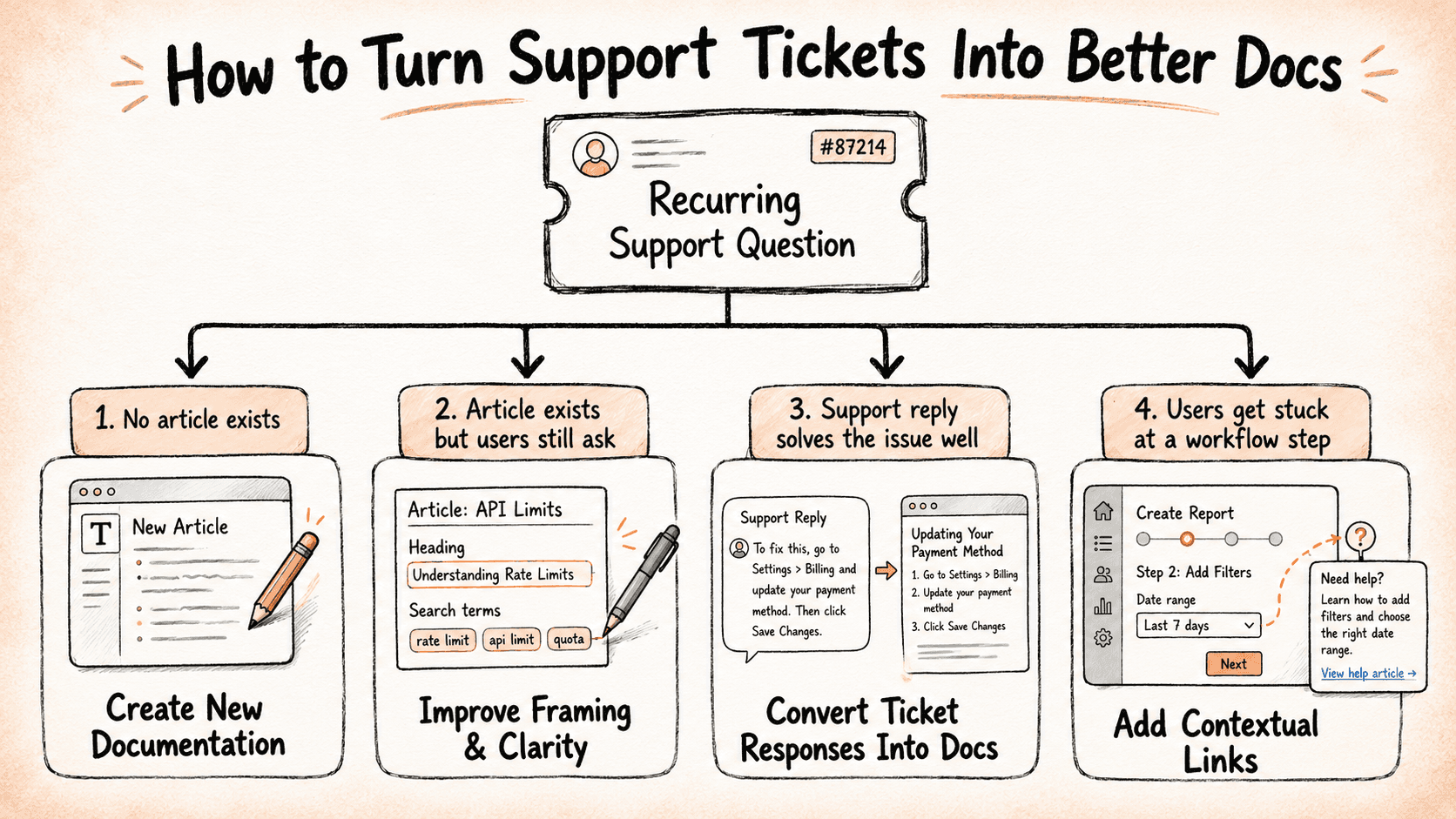
Using ticket resolutions as draft content is an underused shortcut. A well-written support response that solves a problem is often 80% of a documentation article. The expertise is already there, the explanation has already been worked out, and someone confirmed it was helpful. Moving that response into the knowledge base—with a bit of cleanup and formatting—is much lower lift than writing from scratch, and the content tends to be better calibrated to the actual question.
Adding contextual links is sometimes the right intervention when you don't need new content at all. Tickets often show the precise moment in a workflow where users get stuck. If users consistently open tickets at step four of a six-step process, a link to the relevant article placed at step four—in the product UI, in a related doc, or in a tooltip—can close the gap without anything new being written.
Identifying and solving the discoverability problem
Here's something worth pausing on before you start rewriting articles: if ticket volume on a topic stays flat after you've published a new article, the problem probably isn't your content. It is that users aren't finding it.
Writing more content when an article (or a set of articles) already exists won't help. Neither will improving your knowledge base search if the user never opened your knowledge base in the first place.
How to tell the difference
Before deciding on a fix, check for these signs that you have a discoverability problem rather than a coverage one that points at a lack of helpful articles on the topic:
Repeat tickets on a topic continue after a relevant article is live.
Your support agents can find the answer instantly, but users can't surface it through search.
Users are landing on related articles, just not the right one.
You're getting questions about things your docs cover clearly and in detail.
If any of these sound familiar, the issue is in the path to the article and not the article itself.
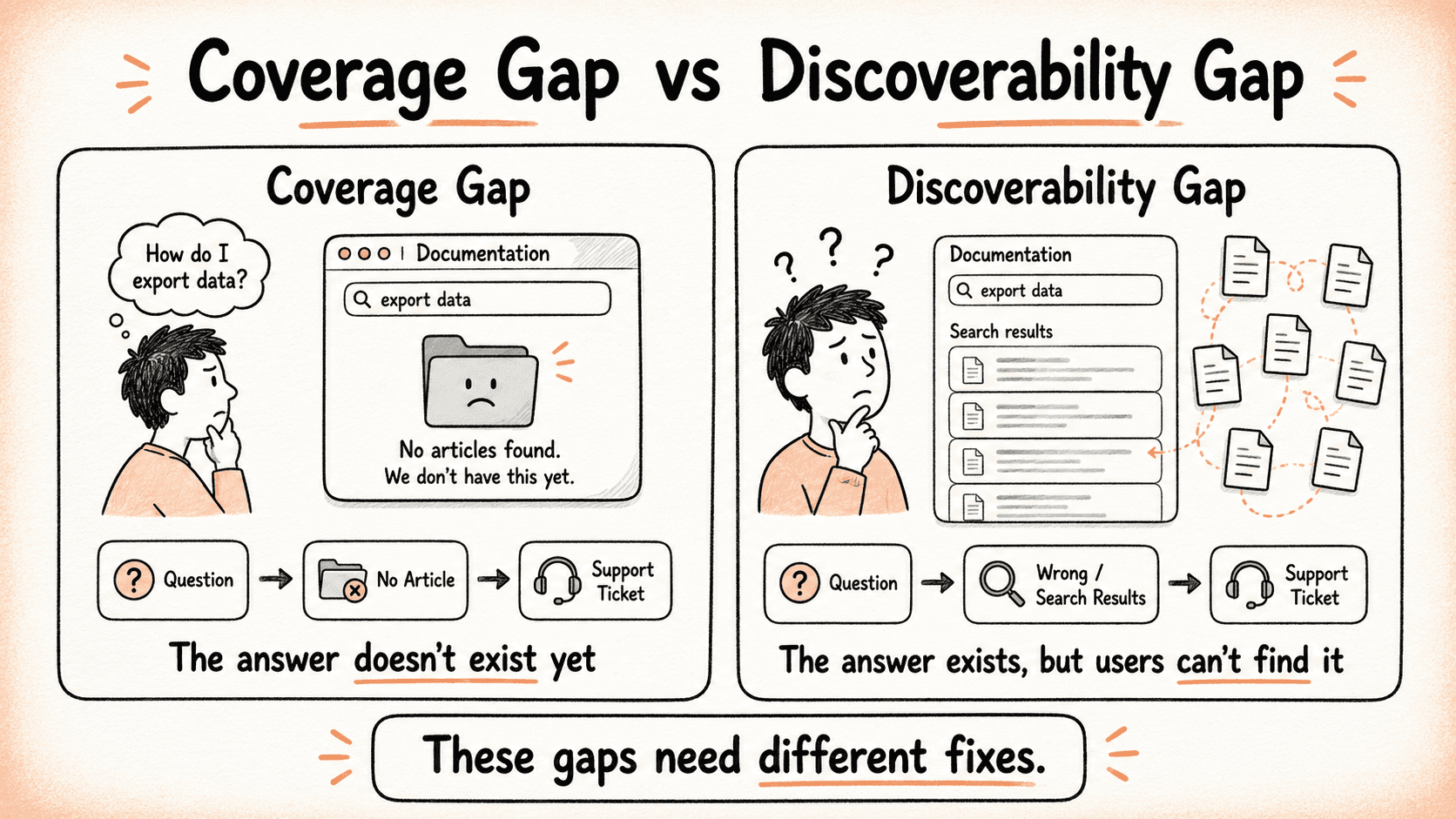
Fix discoverability inside your knowledge base first
The most common issue is a mismatch between how users describe their problem and how your article is titled. Someone who opens a ticket saying "my export isn't working" won't search for "Troubleshooting data output configurations." The content might be identical, but the language isn't.
A few interventions that move the needle:
Revise article titles to match ticket language. The words users write in tickets are the words they searched before giving up. Use them.
Add cross-links from adjacent articles. Users often land somewhere nearby. A well-placed link gets them the rest of the way.
Improve search indexing in your knowledge base. Check whether your platform's search is picking up the terms users actually use, not just the terms you used when writing.
Surface the article in-product at the right moment. A contextual link at the exact point in the workflow where users get stuck can close the gap without any new content at all.
Then consider where users are searching “before” they reach your docs
Here's the problem with solving discoverability only inside your knowledge base: a growing number of users never open it. They ask Claude, ChatGPT, Perplexity, or another AI tool instead—and if your docs aren't showing up there, you have a discoverability gap that your knowledge base search can't touch.
This is where Answer Engine Optimization (AEO) and Generative Engine Optimization (GEO) come in:
AEO is about organizing your content so AI-powered search and chat tools can quickly understand, interpret, and surface the right information.
GEO is about establishing your website or brand as a trusted source that AI systems are confident enough to reference and cite.
Both matter. Well-structured content alone isn't enough if your brand lacks credibility, and strong credibility alone won't help if your content is difficult for AI to interpret. Combining AEO and GEO gives you the best chance of being both understood and recognized by AI-driven search experiences.
Paying attention to the ticket language helps here, too. The words users write in tickets are often close to what they typed into an AI chat before giving up. This makes them useful material when you want to make your docs AI-discoverable. You can do this by rewriting headings into question format, adding key takeaways at the top of articles, and structuring content around problem-solution pairs that AI tools can lift cleanly.
The bottom line: your docs now need to be discoverable in two places—inside your knowledge base and inside the AI tools your users are consulting before they ever think to look at your knowledge base. Teams that address both close gaps faster than those optimizing for only one.
Measuring the impact of your documentation improvements
The primary metric is ticket deflection rate: as the knowledge base improves, the volume of repeat questions should fall. That's the outcome the whole process is pointed at.
A useful tracking habit to build alongside that is to log the date each gap is addressed, then watch ticket volume on that topic over the following 30 to 60 days. This creates a direct line between specific documentation work and support outcomes. It is also useful for calibrating which types of changes have the most impact, and it is the kind of concrete evidence that makes it easier to advocate for investing in documentation when that conversation comes up.
When volume stays flat after a new article, resist the urge to rewrite before diagnosing. Check discoverability first; the content is likely fine, but the placement isn't. The fix is usually faster and simpler than a full rewrite.
Closing the support-to-docs loop
The teams that reduce support volume fastest build a tight feedback loop between support and documentation rather than relying on increasingly comprehensive docs. Comprehensiveness matters, but it matters less than responsiveness to the questions users are actually asking right now.
Tickets are user research you're already collecting. Every queue has information on what users need, where they get stuck, and what language they reach for when they're lost. Reading that as documentation feedback—consistently, with a defined process and shared ownership between support and docs—turns an expensive reactive function into a continuous improvement engine for the knowledge base. The good news is that you're probably already sitting on most of what you need to get started.
Images in this article are created by the author using their sketchnotes and AI-assisted generation.

Written by
Bala Priya C
Bala Priya is a technical writer and contributing editor covering programming, data science, and AI. With a master's in engineering and a background in research and software development, she specializes in breaking down complex topics into practical, accessible guides and tutorials for developers and data scientists at every level. You can connect with her on LinkedIn.

Follow these 3 steps to improve your knowledge base
1
Get expert tips every month in your inbox
No spam, pinky promise.


2
Try the knowledge base software your team will fall in love with
Reduce tickets, make information easy to find.
Happier employees, happier customers.
3
Become the tech writer everyone respects
Check out our podcast, The Not-Boring Tech Writer.
How teams are using KnowledgeOwl
Loved by 3,200+ knowledge base authors in software companies around the world