
All articles
Building trust in SME expertise with augmented AI
Stop wasting hours fact-checking AI output. Learn how providing the right context upfront helps you showcase SME expertise while maintaining credibility.
Published
Category
As documentarians, we've discovered AI's power for summarization and brainstorming. However, many of us hesitate when it comes to showcasing SME expertise. The stakes feel too high—misrepresenting our experts erodes both our credibility and our audiences' trust.
The result? We waste hours fact-checking AI output, sorting invented details from legitimate insights—what I call "work slog." But there's a better way: provide AI with comprehensive context upfront rather than assuming accuracy and verifying everything afterward. In this post, I'll walk you through my process for integrating SME expertise through AI while maintaining trust.
Preparing the context before prompting
The key to maintaining trust with SME expertise lies in preparation. I give my AI collaborator everything it needs upfront, rather than constantly correcting it throughout the chat.
Before developing the content, I create an onboarding packet for the AI model with different files—essentially a retrieval augmented generation (RAG) setup. That way, the AI is better positioned to give me relevant suggestions.
Most generative AI interfaces have an icon where you can attach these files. Here's a screenshot from Microsoft Copilot:
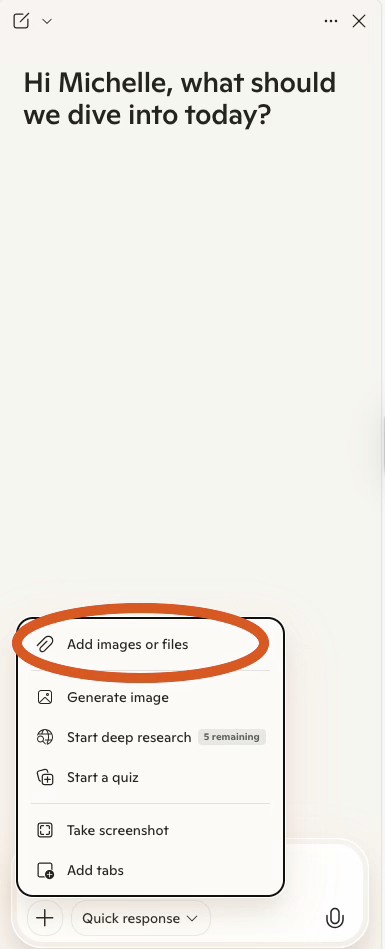
I organize files with clear labels for easier retrieval. The context I give to AI includes the following:
Basic business requirements:
Style guide and any guidelines
Company overview
Audience
Larger strategy
Feedback based on previous submissions
A sample article
Instructions on how to use the information and its priority
SME content:
Each transcript, labeled
My interview notes
Instructions to the AI on what to prioritize
Assignment requirements: This section covers specific parameters for the deliverables, including:
Content brief
Specific stakeholder requests, such as time frame or word count
Examples of published documentation the client has liked
Instructions: I include a text file explaining what I've attached and how the AI should use it. This file covers:
The names of each context file
Each file's priority in the onboarding packet
Guidance on how to use the information
I combine all this information into a knowledge base and attach it to the interface. If needed, I reattach it to every new chat session, since the older information isn't retained.
Key takeaway: Context matters. Alongside your SME contributions, give your AI tool the business requirements, project details, and clear instructions—not just an interview or presentation transcript.
Using AI to weave SME expertise into the content
Once you've set up your AI partner with the right context, you're ready to put it to work throughout your writing process.
Outlining the entire document
I start with a thesis on what I want to write about. For example, I want to show how career growth requires ongoing data management training. Then, I have AI summarize the specific recommendations the experts made about professional development.
This approach keeps you grounded in real expert insights rather than assumptions. Plus, AI will often surface gaps in your SME coverage—areas where you might want to circle back with follow-up questions before you're halfway through writing.
When I realized I was missing CIO-specific guidance, I used AI to help craft targeted follow-up questions for my expert who had mentioned other roles. Then, I emailed her.
I identified the expert, crafted my questions, and ran them through AI to refine the follow-up email. Once I got the response, it went straight back into my knowledge base for this project and future ones.
Finding the SME quotes and wording for the piece
As you're writing, you'll hit sections where you think, "This would be so much stronger with an expert quote." Instead of digging through transcripts, ask your AI assistant to suggest relevant quotes from your SME database that back up your point.
You complete your draft and then go back to edit. At this point, you might want a different angle or a quote from a different expert. AI can surface these alternatives quickly, giving you options to choose the most compelling voice for each point.
If a quote your AI collaborator suggests feels off or out of context, ask it to show you where it came from in the original transcript. This verification step is crucial—you want to make sure you're representing your expert's actual intent, not just grabbing a sound bite.
Tracking down specific details
Sometimes I remember a conversation I had with an SME and want to include it in the piece, but I've forgotten the specifics, or I want more detail, or I want to test out an idea. I bet you can relate.
So instead of winging it or spending time poring through notes, I ask the AI model to find the SME information I need. The results give me a foundation to flesh out and write that section.
When I was writing about data governance best practices, I remembered an expert talking about resource optimization but couldn't recall all the details. I used generative AI to jog my memory and uncover insights I'd missed.
Key takeaway: You can enrich your documentation with impactful insights and quotes from your SMEs using the context you've already provided. Just be sure to validate AI outputs and watch for gaps you still need to fill.
Improving how you leverage your SMEs' expertise
I’m always looking for ways to improve my AI interactions so I can leverage SME expertise more efficiently and produce higher-quality documentation. I save time on prompting by tweaking the resources I provide during preparation, and I track how much work slog I've eliminated—the effort spent re-prompting to get a usable answer.
I reuse and update my context packet for similar documentation projects. I also incorporate feedback from SMEs and my audience to improve how I integrate their expertise. The whole process becomes iterative.
Key takeaway: Use metrics and feedback to iterate on your process for integrating SME expertise. Never stop learning new techniques.
Conclusion
While misusing generative AI can lead to errors, it can also make a real difference in bringing SME expertise into your content. By giving my AI collaborator the context it needs upfront, using it strategically during the writing process, and filling any gaps I find along the way, I've discovered new ways to let SME expertise shine.
Start by building a knowledge base with your SME content and business context, then attach it to your generative AI interface. Use this foundation to surface quotes and summaries that strengthen your audience's understanding and motivate them to take action.

Written by
Michelle Knight
Michelle combines her technical writing craft, software testing experience, and library and information science background to write articles about data management as a documentarian. Her outstanding research and analytical skills provide unique insights about sharing information across an organization. She lives in Portland, Oregon, with her husband Scott and her husky mix, Taffy. She likes crossword puzzles, mindfulness, and trying new activities. You can learn more about her on LinkedIn or her website writing portfolio.

Follow these 3 steps to improve your knowledge base
1
Get expert tips every month in your inbox
No spam, pinky promise.


2
Try the knowledge base software your team will fall in love with
Reduce tickets, make information easy to find.
Happier employees, happier customers.

3
Become the tech writer everyone respects
Check out our podcast, The Not-Boring Tech Writer.

How teams are using KnowledgeOwl
Loved by 3,200+ knowledge base authors in software companies around the world


























