
All articles
How we audit our knowledge base: The Silly Moose process
Learn KnowledgeOwl's proven knowledge base audit process to keep your documentation accurate and useful. Step-by-step guide includes organization tips, tagging systems, and practical advice for maintaining content quality through regular audits.
Published
Category
At KnowledgeOwl, our internal knowledge base is affectionately called "Silly Moose" after our parent company. We do regular content audits to keep our internal documentation accurate, relevant, and useful. After mentioning this in an Owl Academy workshop, several customers asked us to explain our process. This article explains our knowledge base audit process and how you can adapt our methods for your own knowledge base.
Shout-out to Marybeth, our Chief Executive Owl, for creating our audit process!
Why we audit
Knowledge bases are living repositories of knowledge that can become cluttered with outdated information, duplicate content, and articles that are no longer useful. Without regular maintenance, users can struggle to find what they need and teams can lose confidence in their documentation.
Our audit process
We use KnowledgeOwl for our internal Silly Moose knowledge base (as well as for our public Support Knowledge Base), but the following process can be adapted for any knowledge base generated by KnowledgeOwl or any other knowledge base software platform.
Open the article.
Make sure the article title is sentence case (or whichever capitalization style your organization uses).
Briefly review the article and decide whether to keep, archive, or delete it. This isn't the time for rewriting, but small edits are okay.
Keep: Content is relevant and useful
Archive: Content is no longer relevant, but people might want to reference it
Delete: Content is no longer relevant or useful
If you decide to keep the article:
Add the appropriate tags:
Is the correct champion tagged on the article? If not, add the appropriate champion tag.
Determine the content type (explanation, task, or reference) and add the appropriate tag(s). An article can have more than one content type.
Does the content mention an individual by name (e.g. Linus), a role (e.g. CEO), or a tool (e.g. KnowledgeOwl)? Add the appropriate mention tag(s).
Does the content need to be updated? Add the "audit-update me!" if general updates are needed or the "audit-SMC review me!" tag if the docs champion needs to be the one to update the content.
Does the content belong in this section of the knowledge base? If not, change the category to the appropriate section. If unsure, move it to The Sorting Hat and its fate will be decided later.
Save and move on with your life!
If you decide to archive the article (if it’s no longer relevant but people might want to reference it in the future):
Remove the "audit-keep, kill, or combine me!" tag
Change the category to the appropriate subcategory in The Archives
Save
If you decide to delete the article (if it’s no longer relevant or useful):
Remove the "audit-keep, kill, or combine me!" tag
Change status to Deleted
Save
Our information architecture and organization
Our audit process works because it's built on a solid organizational structure:
3-level category system
Top-level categories: Map to major business functions
2nd-level subcategories: Correspond to inner functions within each major area
3rd-level subcategories: Additional subcategories created as needed for organization
Our primary top-level categories
Leadership
BizOps
Product
Engineering
Customers
Marketing
Sales
Our special top-level categories
The Sorting Hat: Temporary home for content we don't know what to do with yet
The Archives: Where good articles retire—removed from search but still accessible for reference
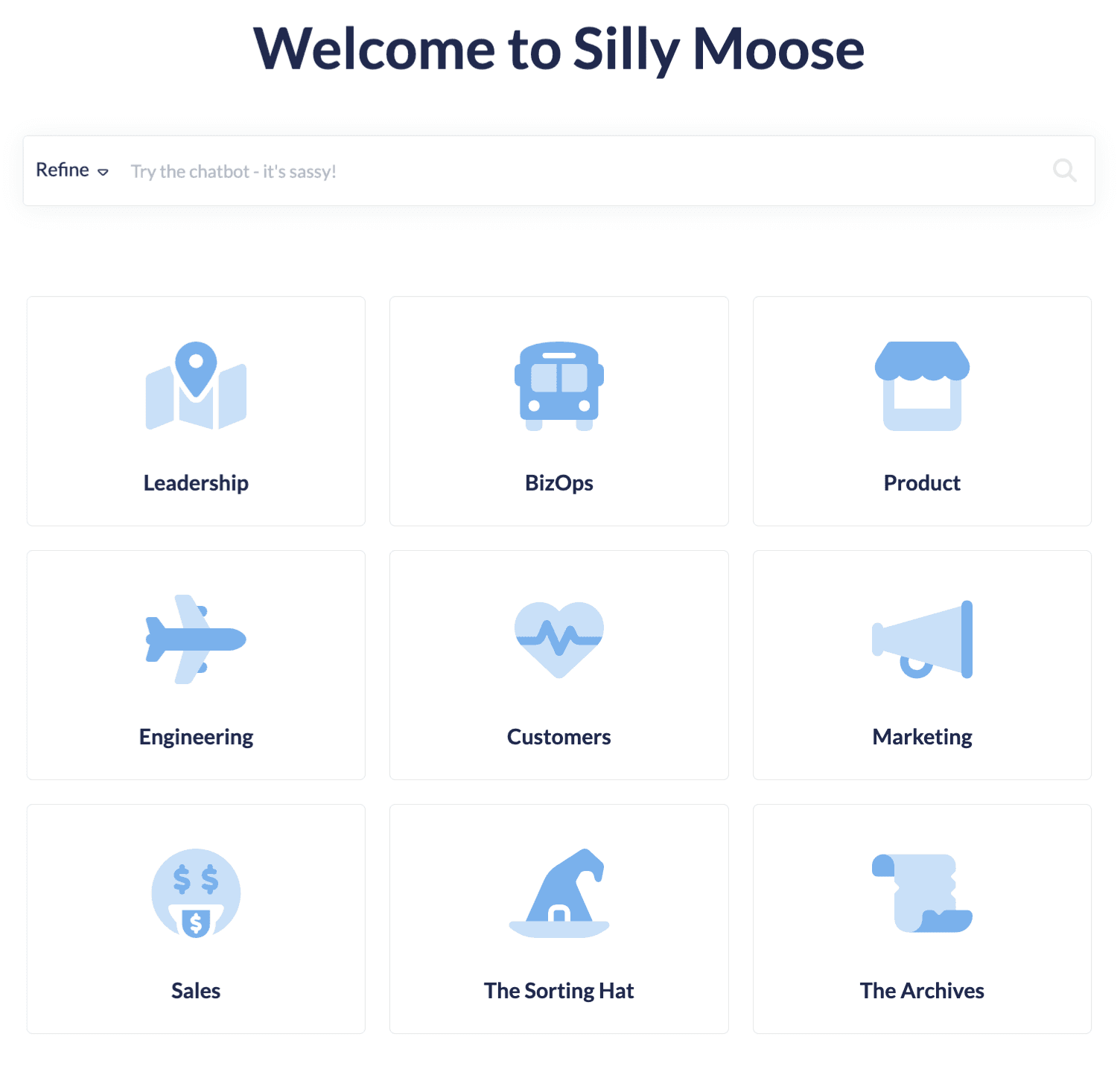
Silly Moose champions
Each section has a designated "Silly Moose champion" (SMC) who is responsible for owning and stewarding it. By default, this is whoever is accountable for that business function, but other team members can champion individual articles when it makes sense.
Our tagging system
Tags are what make our audit process efficient and sustainable:
Required tags:
Champion tag (champion-{name}): Identifies the content owner
Content type tags (type-{contenttype}): Categorizes the type of content in the doc
type-explanation: Concepts and context
type-task: How to do a procedure
type-reference: Quick lookups, facts, policies, etc.
Audit tags:
audit-keep, kill, or combine me!: Waiting to be audited
audit-update me!: Needs to be updated
audit-SMC review me!: Needs to be reviewed by the Silly Moose champion
Mention tags:
mentions-{name}: Mentions an individual by name
mentions-{role}: Mentions a role
mentions-{tool}: Mentions a tool
Update cycle tags:
update-monthly
update quarterly
update-biannually (i.e. every 6 months)
update-yearly
Practical tips for auditing knowledge bases
Start simple: If auditing your knowledge base seems overwhelming, focus on the core decisions first—keep, archive, or delete—and add detailed tagging later. The key is consistency, not perfection.
Batch similar content: Group articles by type, age, or category to make decisions more efficiently.
Use your platform's features: Most knowledge base software platforms offer tagging, categories, and status options. Adapt our system to work with whatever features you have available.
Create clear decision criteria: Establish guidelines for what constitutes "keep," "archive," or "delete" to speed up decision-making and ensure consistency across team members.
Track your progress: Use audit tags to monitor what's been reviewed and what still needs attention.
The bottom line
Content audits don't have to be overwhelming projects that get perpetually postponed. Our Silly Moose audit process proves that with clear procedures, good organization, and simple tagging, you can maintain a healthy knowledge base without burdening your team.
The key is building audit habits into your regular workflow rather than treating auditing as a special project. Whether you adopt our exact process or adapt elements that work for your organization, the important thing is starting somewhere and being consistent.
Your users—and your future self—will thank you for the effort!
If you have any questions about our audit process or auditing your own knowledge base, feel free to reach out to support@knowledgeowl.com. We also offer expert knowledge management coaching, in partnership with our friend Kate Mueller from knowledge with saas.

Written by
Chad Timblin
Chad Timblin (he/him) is the Executive Assistant to the CEO & Friend of Felines at KnowledgeOwl. Connect with him on LinkedIn.

Follow these 3 steps to improve your knowledge base
1
Get expert tips every month in your inbox
No spam, pinky promise.


2
Try the knowledge base software your team will fall in love with
Reduce tickets, make information easy to find.
Happier employees, happier customers.

3
Become the tech writer everyone respects
Check out our podcast, The Not-Boring Tech Writer.

How teams are using KnowledgeOwl
Loved by 3,200+ knowledge base authors in software companies around the world


























