
All articles
Write the Docs – OMG it's error 5 and the joys of microcopy by Hadas Khen
Hadas Khen delivered this excellent talk on how to improve the microcopy of your software interface, which also provided a basic introduction to microcopy.
Published
Category
Write the Docs – OMG it's error 5 and the joys of microcopy by Hadas Khen
Catherine Heath | June 3, 2019
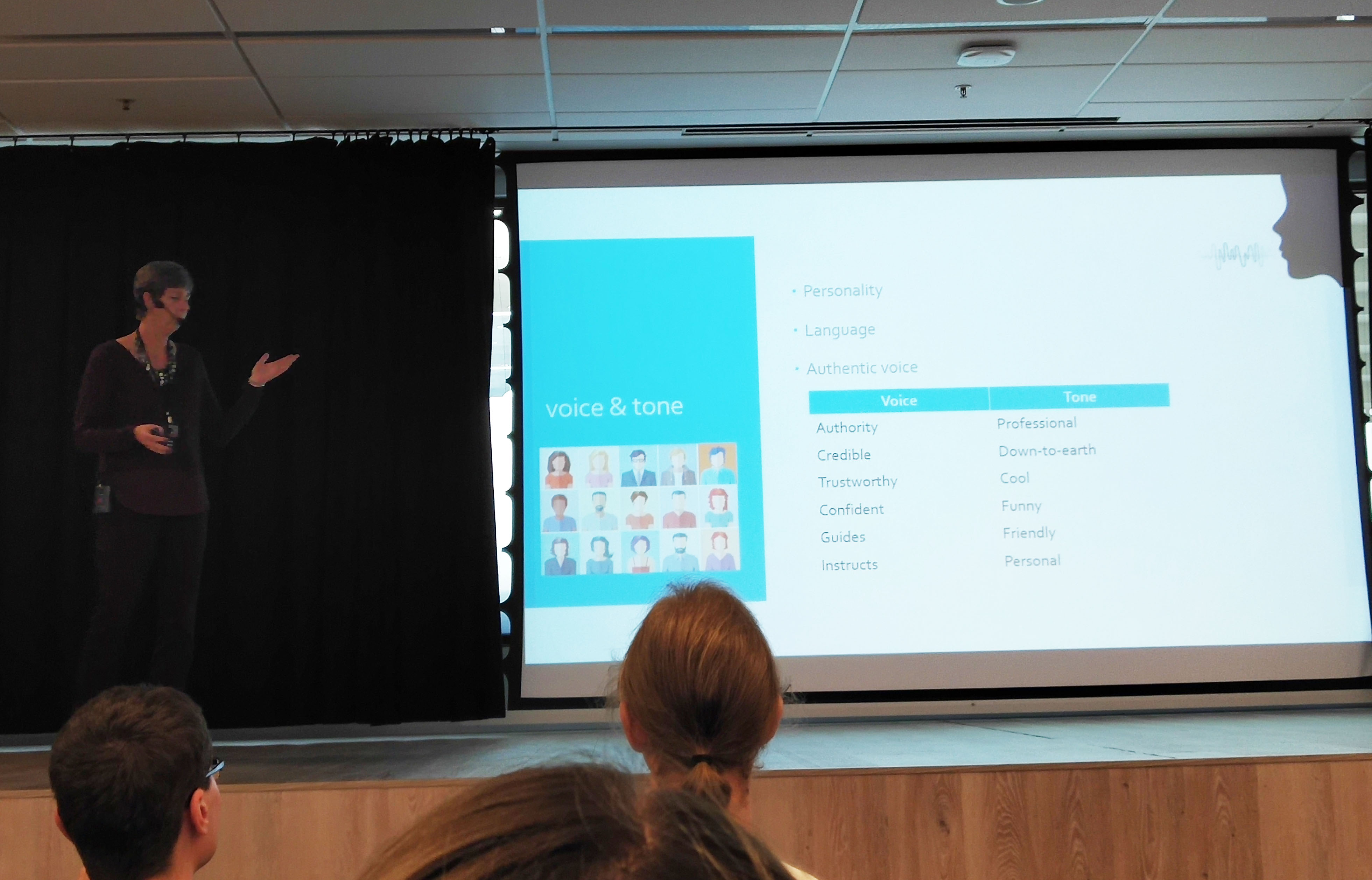
Hadas Khen is a technical communicator. She grew up in Canada but is now based in Israel. Hadas gave us a solid introduction into the joys of microcopy at Write the Docs Vilnius, and provided extensive practical tips on how you can improve the microcopy within your own software interface.
Microcopy is a very important part of the User Experience in a software product. Annoyingly, it's also an area that technical writers often have little control over. Frequently, no one is taking oversight of the microcopy and it becomes a bit of an afterthought.
For these reasons, technical writers have a big contribution to make when it comes to improving microcopy. Hadas breaks it down into these steps:
Develop your voice and tone – How is your microcopy written?
Know your target audience – Who is your microcopy aimed at?
Basic principles of microcopy – Simple, precise, practical, accurate
Apply these principles in your work – Put the theory into practice.
Build relationships in your team – Promote the benefits of good microcopy.
Write, say out loud, write again – Gain some distance from your writing to see it from your user's perspective.
Consider these factors:
Quantity – How much microcopy do you need?
Tone – How will it be written? Human, personable, polite
Placement – Where will it be placed in the interface? It should be next to the UI element it refers to.
Timing – When will your messages show up? It should be specific to the issue that is happening.
Result – What are you trying to get your users to do?
According to Hadas, the right words at the right time can completely change the user experience. Microcopy was a term coined by Joshua Porter when working on a billing system. He realised that users were failing to complete their payment because the address they entered didn't match the one on their credit card. He added some copy to remind users that their address needed to match.
One line changed how users used the system, and all the problems went away. Microcopy gives users feedback in real-time while they are using your interface, and provides information on what they can do to successfully complete the required actions in your software.
Voice and tone
Voice and tone is very important in your microcopy. There is a difference between voice and tone. For example, your voice might have authority, but your tone might be professional.
Voice is part of your overall brand and you can think of it like the voice of a person, which is a unified entity. A tone is dependent on context, and can change depending on your purpose. We use different tones depending on who we are speaking to and how they are feeling at the time.
"Make your product into a person," says Hadas, since it will become representative of the customer you want to approach.
Your voice and tone has to reflect your company brand and the aims you want to achieve with your microcopy. For example, your tone should be helpful rather than critical. You should think carefully about how well any use of humor might be received.
Target audience
Define your target audience. This includes their demographics, user needs, motivations, concerns, preferences, and relationship to your brand.
Your microcopy should be supportive of your users, and you never shame your users for not doing certain things. For example, rather than "Did you forget your password again?" you can just say "Did you forget your password?" This is less aggressive and more helpful.
"User approach new things with a sense of unease," says Hadas, and it's the job of your microcopy to put them at ease with your product.
If your microcopy unfortunately adds to the unease, this becomes bad user experience, and can lead to customer churn. As a professional writer, you must think like your user, ask the questions that have not yet been asked, and provide users with satisfaction and confidence.
Basic principles of microcopy
You need to know the microcopy building blocks in order to start writing better microcopy. Think of yourself as the writer, but also as the user.
Choose your words carefully, since the technical ability of software users is variable. Consider differing levels of English ability, be human and nice, and write as your users naturally speak.
There's a fine line between "fluff", "rude", and "human". Fluff wastes your user's time, while rude is offensive and turns users off. Being human means being clear, direct, and polite.
You have to ground the microcopy to particular elements in the interface, so users know what your microcopy is referring to. It can't just be floating around on its own, or this will only confuse your users more.
Keep your microcopy:
Simple
Precise
Practical
Relevant (technical)
Grammatically correct
These are all things to consider when writing your microcopy.
Error messages
An error message describes an issue preventing the user from completing a task. It usually appears as a pop-up in the interface. The downside of error messages is that users have been prevented from completing a task, they disrupt an important process, and they annoy people. This then leads to more users contacting support, which puts a strain on your resources.
Your error messages are an important chance to prevent some of these requests to support. If you make them more informative, you solve your user's issue before it has a chance to become a real obstacle.
Write your error messages from the user's point of view, not the developer's. Your error messages should be human-like, and not robotic. It's a one-sided conversation, but conversation nonetheless. Your error message language should mimic customer service language – make it personal, professional, and polite.
Improving your writing
Error messages should be written in active voice. They should also be:
Clear and practical
Calm and supportive
Simple sentences
Culturally sensitive
Potentially avoid humor depending on your target audience
Allow your users to choose progressive disclosure, so use a show and hide option. Users can decide what to see in their own time, and they don't have to view more information about the error if they don't want to.
In-line validation highlights when users have not filled in a form field correctly, so these error messages are more seamlessly merged with the interface.
Sometimes you're missing a sales opportunity if users try to perform a "forbidden" action that requires a more expensive license. It's an opportunity to help them solve a problem by highlighting the existence of a different licensing option.
Hadas showed us many examples of aggressive and rude error messages. There are some negative words you can avoid, like "error", "problem", "forbidden", "invalid", since these are shaming for your users. At the same time, you don't need to be repetitively polite, because this is almost equally annoying.
Final remarks
Build relationships with your coworkers and respect their capabilities. If you have strong relationships, it will be easier to come together for the shared goal of creating the best possible user experience, and to collaborate on microcopy.
Follow Hadas on twitter or find her on LinkedIn. Check out our write-up of our experiences at Write the Docs Vilnius.
Our very own knowledge base software KnowledgeOwl can help you create delightful documentation for your users. Take it for a free spin now.
{{snippet.authorCatherineHeath}} {{snippet.Disqus}}

Written by
Catherine Heath
Catherine is a freelance writer based in Manchester who writes blogs, social media content, and copy. She also designs owl-based images. 🦉

Follow these 3 steps to improve your knowledge base
1
Get expert tips every month in your inbox
No spam, pinky promise.


2
Try the knowledge base software your team will fall in love with
Reduce tickets, make information easy to find.
Happier employees, happier customers.

3
Become the tech writer everyone respects
Check out our podcast, The Not-Boring Tech Writer.

How teams are using KnowledgeOwl
Loved by 3,200+ knowledge base authors in software companies around the world


























